Composer dependency conflict decoder
Paste Composer's "Your requirements could not be resolved" output and get the blocking package, the exact `why-not` commands to run, and the order to resolve the conflict in.
About the composer dependency conflict decoder
Composer's "Your requirements could not be resolved to an installable set of packages" message is technically complete and practically unreadable. It lists every path the resolver tried, in dependency order, without telling you which single constraint is actually blocking you. This decoder reads that block and pulls out the blocking packages, your own root requirements, and the shape of the conflict.
The output is deliberately command-first. Rather than guessing at version numbers, you get the exact `composer why-not` invocation for the first blocking package, because that command prints the authoritative answer in one line.
When to use it
- An upgrade hop fails on `composer update` and the error block is longer than your terminal scrollback.
- A package installs locally but fails in CI, which usually means the two environments disagree about the platform PHP version.
- You inherited an application and need to know which dependency is pinning the whole tree to an old framework release.
- You want to know whether a conflict is caused by your own composer.json or by a third-party package before you open an issue upstream.
What it does not do
- It does not resolve the conflict for you. Composer is the only thing that can do that, and the decoder generates the commands rather than guessing at a lock file.
- It does not fetch package metadata from Packagist, so it cannot tell you which version would satisfy everything — `composer why-not` does that with real data.
- It will not recommend `--ignore-platform-reqs` as a fix, because that produces an artifact your runtime cannot execute.
How the result is produced
The parser scans each line for `vendor/package` identifiers and for the phrases Composer uses when it reports a failure: "requires", "conflicts with", "does not satisfy", "could not be found in any version" and the platform messages about PHP versions and extensions. Lines carrying those markers become blockers, and the first package named on each line is treated as the subject.
The conflict category is inferred from platform markers first, then stability, then missing packages, then version conflicts, because that is the order in which they are worth fixing. The generated command list changes with the category: platform conflicts get `composer config platform.php` checks, extension conflicts get a `php -m` check.
Real inputs and the exact output
Every example below was run through this composer dependency conflict decoder and copied verbatim.
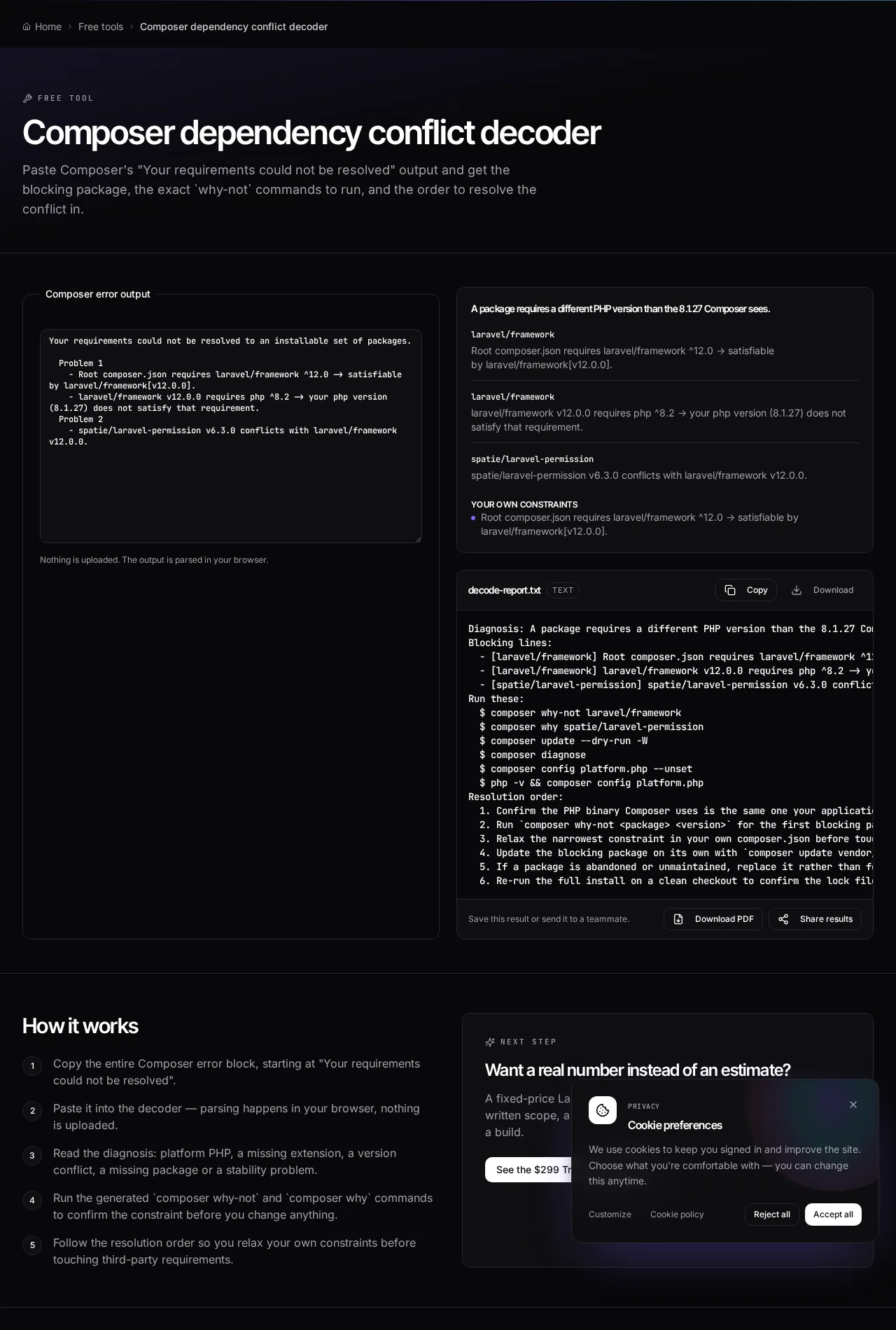
Example 1: Platform PHP blocks a Laravel 12 upgrade
A team bumps the framework constraint to ^12.0 on a server still running PHP 8.1. Composer reports the problem across four lines and the real cause is on the last one.
Before touching any package constraint, confirm whether the PHP version Composer sees is the real binary or a stale `platform.php` override. Unsetting a forgotten override resolves this class of conflict without a single dependency change.
Composer output
Your requirements could not be resolved to an installable set of packages.

  Problem 1
    - Root composer.json requires laravel/framework ^12.0 -> satisfiable by laravel/framework[v12.0.0].
    - laravel/framework v12.0.0 requires php ^8.2 -> your php version (8.1.27) does not satisfy that requirement.
Decoded
Diagnosis: A package requires a different PHP version than the 8.1.27 Composer sees.

Blocking lines:
  - [laravel/framework] laravel/framework v12.0.0 requires php ^8.2 -> your php version (8.1.27) does not satisfy that requirement.

Run these:
  $ composer why-not laravel/framework
  $ composer update --dry-run -W
  $ composer config platform.php --unset
  $ php -v && composer config platform.php
Example 2: A community package pins the whole tree
The framework upgrade resolves, but a permissions package refuses to install alongside it. The decoder names the package and generates the command that prints the exact constraint.
The conflict is in your own root constraint, not in the package. Widening `^6.3` to allow the next minor is usually the one-line fix; forcing the resolver is not.
Composer output
  Problem 1
    - spatie/laravel-permission v6.3.0 conflicts with laravel/framework v12.0.0.
    - Root composer.json requires spatie/laravel-permission ^6.3 -> satisfiable by spatie/laravel-permission[v6.3.0].
Decoded
Diagnosis: Two packages pin incompatible versions of a shared dependency.

Run these:
  $ composer why-not spatie/laravel-permission
  $ composer why laravel/framework
  $ composer update --dry-run -W

Resolution order:
  1. Relax the narrowest constraint in your own composer.json first.
  2. Update the blocking package on its own: composer update spatie/laravel-permission -W
How it works
- Copy the entire Composer error block, starting at "Your requirements could not be resolved".
- Paste it into the decoder — parsing happens in your browser, nothing is uploaded.
- Read the diagnosis: platform PHP, a missing extension, a version conflict, a missing package or a stability problem.
- Run the generated `composer why-not` and `composer why` commands to confirm the constraint before you change anything.
- Follow the resolution order so you relax your own constraints before touching third-party requirements.
Frequently asked questions
- What does "Your requirements could not be resolved to an installable set of packages" mean?
- Composer found no combination of package versions that satisfies every constraint at once. The message that follows names the packages involved; the decoder pulls those out and tells you which constraint is the narrowest one.
- What is the difference between composer why and composer why-not?
- `composer why vendor/package` shows which installed packages depend on it. `composer why-not vendor/package 2.0` shows what is preventing that specific version from being installed. When you are stuck on a resolver error, `why-not` is nearly always the command you want.
- Should I use --ignore-platform-reqs to get past the error?
- Only to inspect a dependency tree locally, never to build a deployable artifact. It installs code that your PHP runtime cannot actually run, so the failure moves from install time to run time where it is far more expensive to find.
- Why does Composer report a PHP version I am not running?
- Because `platform.php` in composer.json overrides the real binary, or because the CLI PHP differs from the FPM PHP serving your application. Run `composer config platform.php` and `php -v` and compare — the decoder suggests exactly this when it detects a platform conflict.
- How do I upgrade one package without updating everything?
- Use `composer update vendor/package -W`. The `-W` flag also updates that package's own dependencies, which is usually required for the change to resolve, while leaving the rest of your lock file alone.
Want a real number instead of an estimate?
A fixed-price Laravel codebase and architecture audit gives you a written scope, a risk list and a delivery date before you commit to a build.
Related free tools
composer.json validator — Check a composer.json for invalid JSON, malformed package names, unbounded version constraints and broken PSR-4 autoload rules before Composer refuses to install.
Laravel upgrade readiness scanner — Paste composer.json and composer.lock to see which Laravel and PHP versions you are on, which packages block the upgrade, how many major hops stand between you and Laravel 13, and what to fix first.
Laravel version and EOL risk checker — Enter your Laravel and PHP versions to see support status against the published release schedules, how many upgrade hops you are behind, and whether this is a maintenance task or a live security exposure.
All free Dev Loader tools
Every tool below runs entirely in your browser — no account, no upload and no limits. 25 tools in total.
- Software development cost calculator
- Website cost calculator
- App development cost calculator
- Freelance rate calculator
- Cron expression generator
- Meta tag generator
- .htaccess redirect generator
- PHP formatter
- JSON to PHP array converter
- composer.json validator
- Laravel upgrade readiness scanner
- PHP version compatibility checker
- URL slug generator
- Unix timestamp converter
- Laravel .env generator
- PHP regex tester
- Laravel migration generator
- Laravel validation rule builder
- Laravel .gitignore generator
- Artisan command cheatsheet
- Carbon date format helper
- Laravel failed job decoder
- Laravel Cashier webhook diagnostic
- Laravel version and EOL risk checker
- Free tools hub