Laravel migration generator
A free Laravel migration generator and visual schema builder: design a table — columns, types, nullability, indexes, foreign keys — and get a valid migration class with the correct filename.
About the laravel migration generator
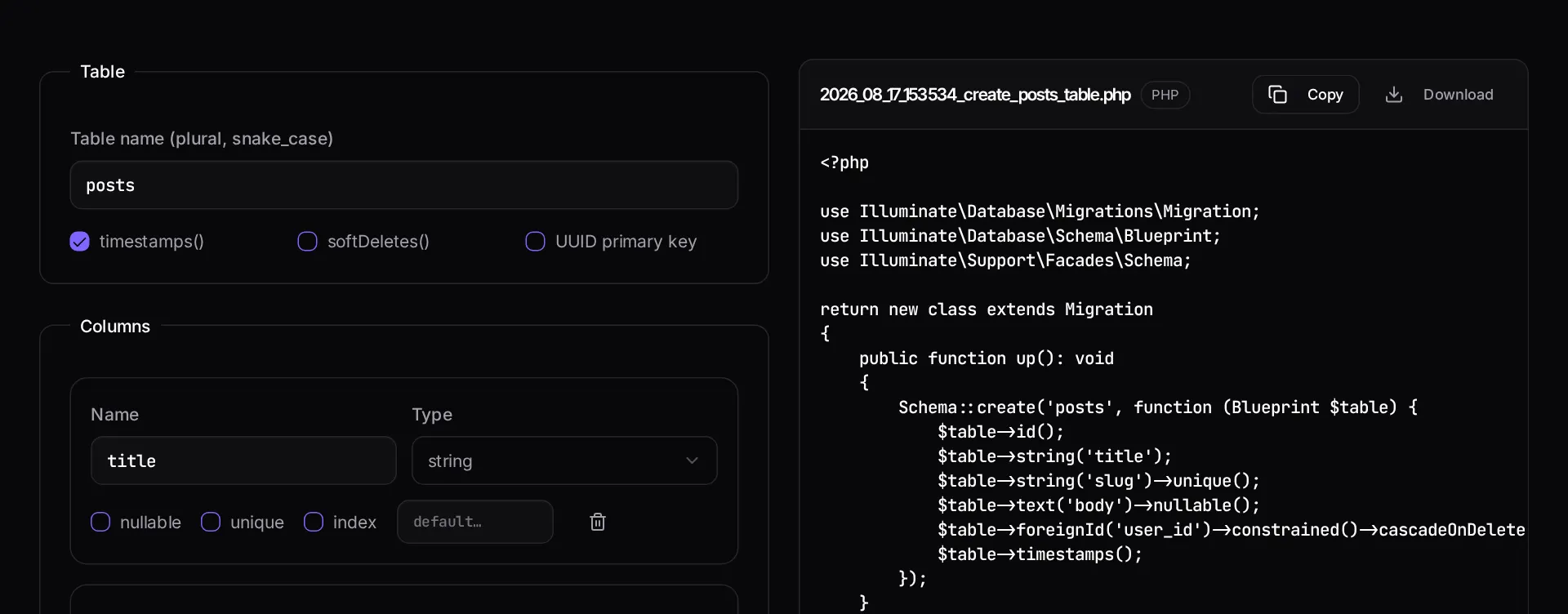
Writing a migration by hand means remembering the column-type method names, the modifier order, and the timestamped filename convention. This generator lets you design the table visually — columns, types, nullability, defaults, indexes and foreign keys — and emits a valid migration class.
The filename matters as much as the contents, because migration order is filename order. The download comes with the correct timestamp prefix.
When to use it
- You are sketching a new table and want the schema and the code to stay in step.
- You are adding foreign keys and want the constraint syntax right first time.
- You are teaching or reviewing and want a clean reference migration.
- You need a migration file without a working local CLI.
What it does not do
- It generates create-table migrations, not diffs against an existing schema.
- It does not write the Eloquent model, factory or seeder alongside it.
- Data backfills belong in their own migration or job.
How the result is produced
Each column maps to its schema builder method with modifiers applied in the order the builder expects. Timestamps, soft deletes and a UUID primary key are toggles, and both up and down methods are generated so the migration is reversible.
What to watch out for
Migration filenames are ordering, and ordering is correctness. A migration that creates a foreign key must run after the table it points at exists, which means the timestamp prefix is not decoration. Generating the file with the right prefix avoids the class of failure where a migration works locally and breaks on a fresh database.
Add indexes deliberately at creation time. Adding one later to a large table is an operation that may lock writes, and the column you will want indexed is almost always the one you filter or join on — foreign keys, status columns, and anything you sort by.
Keep schema changes and data backfills in separate migrations. Combining them makes rollback ambiguous and makes a slow backfill hold a schema lock longer than it needs to.
Think about the down method as you design the table, not afterwards. A migration whose rollback has never been run is a migration you cannot safely deploy under time pressure, because the moment you need to reverse it is the moment you discover it does not reverse cleanly. Running the rollback locally as part of writing the migration takes seconds. On production data, prefer forward fixes to rollbacks anyway — but knowing the rollback works is what lets you choose rather than hope.
Real inputs and the exact output
Every example below was run through this laravel migration generator and copied verbatim.
Example 1: An invoices table with a tenant foreign key and a status enum
Multi-tenant SaaS billing table with soft deletes.
Store money as integer cents, never as a float. And index the pair you actually filter on (`tenant_id, status`), not each column separately.
database/migrations/…_create_invoices_table.php
<?php

use Illuminate\Database\Migrations\Migration;
use Illuminate\Database\Schema\Blueprint;
use Illuminate\Support\Facades\Schema;

return new class extends Migration
{
    public function up(): void
    {
        Schema::create('invoices', function (Blueprint $table) {
            $table->id();
            $table->foreignId('tenant_id')->constrained()->cascadeOnDelete();
            $table->string('number')->unique();
            $table->enum('status', ['draft', 'sent', 'paid', 'void', 'refunded'])
                  ->default('draft');
            $table->unsignedBigInteger('total_cents');
            $table->char('currency', 3)->default('USD');
            $table->timestamp('paid_at')->nullable();
            $table->timestamps();
            $table->softDeletes();

            $table->index(['tenant_id', 'status']);
        });
    }

    public function down(): void
    {
        Schema::dropIfExists('invoices');
    }
};
How it works
- Name the table and add each column with its type and modifiers.
- Toggle timestamps, soft deletes and a UUID primary key as needed.
- Copy the migration or download it with the correctly timestamped filename.
Frequently asked questions
- Where do I put the generated file?
- In `database/migrations/` using the generated filename — Laravel runs migrations in filename timestamp order, so the prefix matters. Then run `php artisan migrate`.
- Should I index every column I filter on?
- Index the columns you filter, join or sort on frequently, and prefer a composite index that matches your most common query over several single-column ones. Every index slows writes, so add them deliberately rather than by default.
- Why does the foreign key use cascadeOnDelete?
- It is the safest common default for child records that are meaningless without their parent. If the child should survive, change it to `nullOnDelete()` and make the column nullable, or `restrictOnDelete()` to block the delete entirely.
Schema fighting you as the product grows?
A Laravel performance and architecture audit reviews your data model, indexes and query patterns, and gives you a written plan for fixing the expensive parts.
Related free tools
Laravel validation rule builder — Pick fields and field types and get a complete FormRequest class with array-syntax validation rules you can paste straight into a Laravel app.
PHP version compatibility checker — Paste PHP and see the minimum version it needs, plus every removed or deprecated function that will break on a modern runtime.
Laravel .env generator — Build a correct .env for local, staging or production — with a freshly generated APP_KEY and the driver settings that match your stack.
All free Dev Loader tools
Every tool below runs entirely in your browser — no account, no upload and no limits. 25 tools in total.
- Software development cost calculator
- Website cost calculator
- App development cost calculator
- Freelance rate calculator
- Cron expression generator
- Meta tag generator
- .htaccess redirect generator
- PHP formatter
- JSON to PHP array converter
- composer.json validator
- Laravel upgrade readiness scanner
- PHP version compatibility checker
- URL slug generator
- Unix timestamp converter
- Laravel .env generator
- PHP regex tester
- Laravel validation rule builder
- Laravel .gitignore generator
- Artisan command cheatsheet
- Carbon date format helper
- Composer dependency conflict decoder
- Laravel failed job decoder
- Laravel Cashier webhook diagnostic
- Laravel version and EOL risk checker
- Free tools hub