Laravel failed job decoder
Paste a row from your `failed_jobs` table and get the job class, queue, attempt count, a failure category and the specific fixes that apply — decoded locally, never unserialized.
About the laravel failed job decoder
A row in `failed_jobs` contains everything you need to diagnose a queue failure, packed into a JSON payload and a stack trace that are both awkward to read in a database client. This decoder separates them: identity on one side (job class, connection, queue, attempts against max tries) and cause on the other (a failure category derived from the exception).
The payload is treated as text throughout. The serialized job object is never passed to `unserialize()`, so pasting a production payload cannot execute anything — the class name is extracted with a pattern match instead.
When to use it
- Your failed_jobs table is filling up and you need to know whether the rows share one cause or several before you retry them.
- A job fails only in production and you need the queue, connection and attempt count to reproduce the conditions locally.
- You are triaging after an incident and want a categorised summary to paste into the postmortem.
- A junior engineer needs a readable explanation of what the exception means rather than a raw framework trace.
What it does not do
- It cannot see your code, so it categorises the failure and lists the fixes that apply to that category rather than pointing at a line in your repository.
- It does not connect to your database or queue. Copy one row in; nothing goes out.
- It is not a replacement for Horizon or a log aggregator when you need failure trends over time.
How the result is produced
Identity fields come straight from the payload JSON: `displayName` for the job class, with a fallback to `data.commandName` and then to a pattern match on the serialized command string. Queue, connection, attempts and maxTries are read directly when present.
The exception text is matched against a rule table covering the failure modes that account for most queue incidents: retry exhaustion and timeouts, memory exhaustion, database errors including deadlocks and duplicate keys, outbound HTTP failures, serialization and missing-model errors, missing files, permissions, and validation thrown inside a job. Each rule carries its own explanation and fix list, so the advice is specific to the category rather than generic queue tuning.
Real inputs and the exact output
Every example below was run through this laravel failed job decoder and copied verbatim.
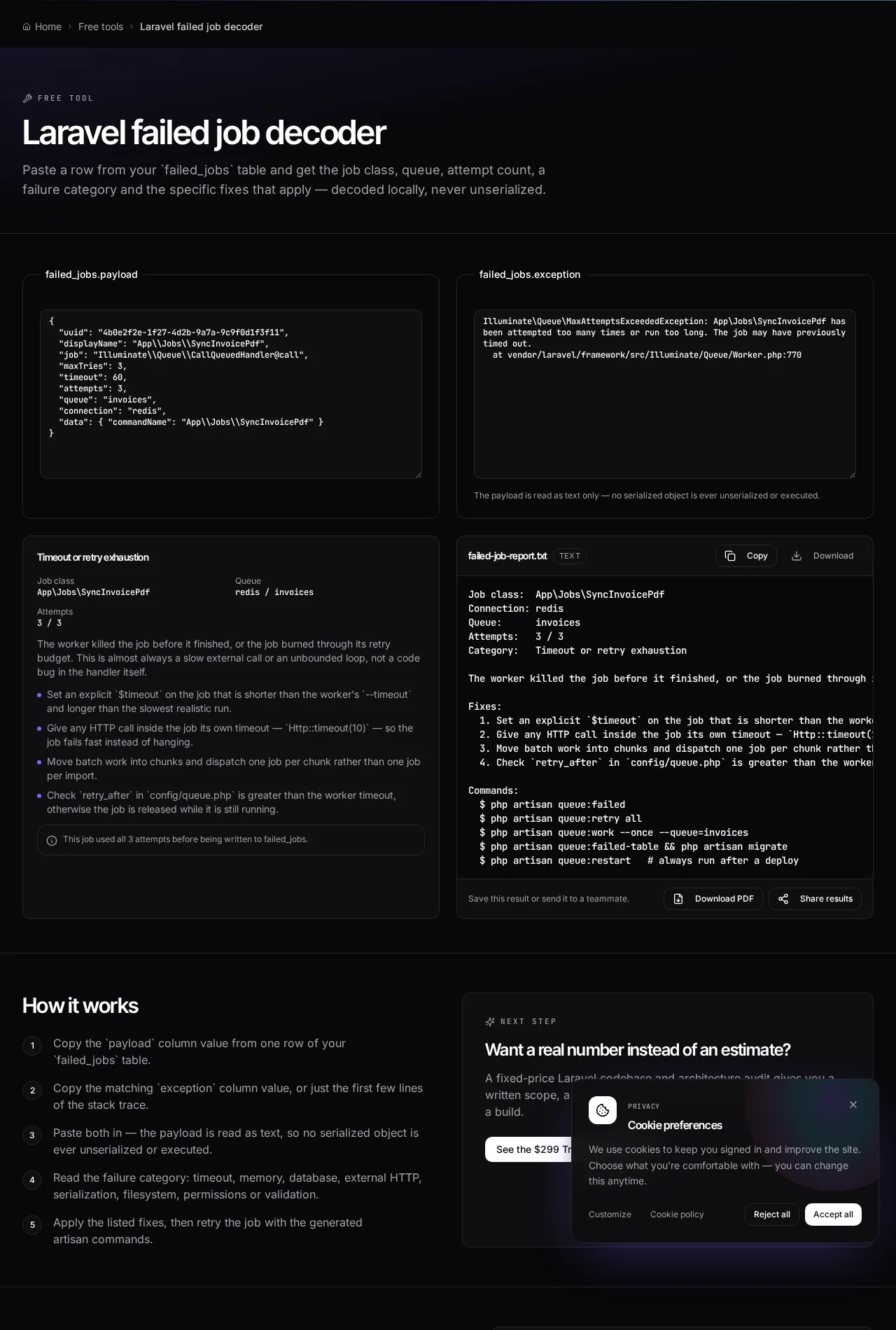
Example 1: A PDF sync job exhausting its retries
Three attempts, all timing out. The exception names MaxAttemptsExceededException, which reads like a retry problem but is really a timeout problem.
When `retry_after` is smaller than the worker timeout, healthy long-running jobs get released and retried while still in flight — the queue reports retry exhaustion for a job that never actually failed.
failed_jobs row
{
  "displayName": "App\\Jobs\\SyncInvoicePdf",
  "maxTries": 3,
  "timeout": 60,
  "attempts": 3,
  "queue": "invoices",
  "connection": "redis"
}
-- exception --
Illuminate\Queue\MaxAttemptsExceededException: App\Jobs\SyncInvoicePdf has been
attempted too many times or run too long.
Decoded
Job class:  App\Jobs\SyncInvoicePdf
Connection: redis
Queue:      invoices
Attempts:   3 / 3
Category:   Timeout or retry exhaustion

Fixes:
  1. Set an explicit $timeout on the job, shorter than the worker --timeout.
  2. Give every HTTP call its own timeout: Http::timeout(10).
  3. Chunk batch work and dispatch one job per chunk.
  4. Ensure retry_after in config/queue.php exceeds the worker timeout.
Example 2: A deploy that renamed a job class
Payloads queued before the deploy still reference the old class. The worker cannot unserialize them and every one lands in failed_jobs at the same second.
Job class renames and constructor changes are deploy-ordering problems, not code problems. Ship the new class first, let the old queue drain, then remove the old one.
exception
Error: Class "App\Jobs\SendWelcomeMail" not found
  at vendor/laravel/framework/src/Illuminate/Queue/CallQueuedHandler.php:98
Decoded
Category: Serialization or missing model

Fixes:
  1. Queue identifiers, not fat objects; re-fetch inside handle().
  2. Use $deleteWhenMissingModels = true on jobs that take a model.
  3. Drain or version the queue before deploying a job class rename.
  4. Never change a job constructor signature while payloads are pending.

Commands:
  $ php artisan queue:failed
  $ php artisan queue:restart   # always run after a deploy
How it works
- Copy the `payload` column value from one row of your `failed_jobs` table.
- Copy the matching `exception` column value, or just the first few lines of the stack trace.
- Paste both in — the payload is read as text, so no serialized object is ever unserialized or executed.
- Read the failure category: timeout, memory, database, external HTTP, serialization, filesystem, permissions or validation.
- Apply the listed fixes, then retry the job with the generated artisan commands.
Frequently asked questions
- How do I read a Laravel failed job payload?
- The payload is JSON. `displayName` is the job class, `queue` and `connection` tell you where it ran, `attempts` and `maxTries` tell you whether it exhausted its retries, and `data.command` holds the serialized job object. This tool extracts all of those without unserializing anything.
- What causes MaxAttemptsExceededException?
- Either the job genuinely failed on every attempt, or the worker timeout fired while the job was still running and the job was released back and retried. Check that `retry_after` in config/queue.php is larger than the worker's `--timeout`; when it is smaller, healthy jobs get retried while still in flight.
- Why does my job fail with ModelNotFoundException after a deploy?
- Queued payloads serialized before the deploy still reference the old class name or the old constructor signature. Drain the queue before renaming a job class, set `$deleteWhenMissingModels = true` for deleted records, and always run `php artisan queue:restart` so workers load new code.
- How do I retry a single failed job?
- `php artisan queue:retry <uuid>` pushes that one job back onto its queue. `php artisan queue:retry all` re-queues everything in the table — useful after fixing a shared cause such as an expired API key, risky when the failures have different causes.
- Is it safe to paste a production payload into this tool?
- The parsing runs entirely in your browser and nothing is transmitted. Even so, payloads can contain customer identifiers, so redact anything sensitive before sharing the generated report with someone else.
Want a real number instead of an estimate?
A fixed-price Laravel codebase and architecture audit gives you a written scope, a risk list and a delivery date before you commit to a build.
Related free tools
Laravel Cashier webhook diagnostic — Answer eight questions about your billing webhook and get a ranked list of blockers and risks — signature mismatch, CSRF, wrong mode, missing events, dead queue workers, duplicate deliveries and drifted subscription state.
Artisan command cheatsheet — A searchable reference of the Artisan commands you actually use — what each one does, when to reach for it, and the flags worth knowing.
Laravel .env generator — Build a correct .env for local, staging or production — with a freshly generated APP_KEY and the driver settings that match your stack.
All free Dev Loader tools
Every tool below runs entirely in your browser — no account, no upload and no limits. 25 tools in total.
- Software development cost calculator
- Website cost calculator
- App development cost calculator
- Freelance rate calculator
- Cron expression generator
- Meta tag generator
- .htaccess redirect generator
- PHP formatter
- JSON to PHP array converter
- composer.json validator
- Laravel upgrade readiness scanner
- PHP version compatibility checker
- URL slug generator
- Unix timestamp converter
- Laravel .env generator
- PHP regex tester
- Laravel migration generator
- Laravel validation rule builder
- Laravel .gitignore generator
- Artisan command cheatsheet
- Carbon date format helper
- Composer dependency conflict decoder
- Laravel Cashier webhook diagnostic
- Laravel version and EOL risk checker
- Free tools hub