Laravel upgrade readiness scanner
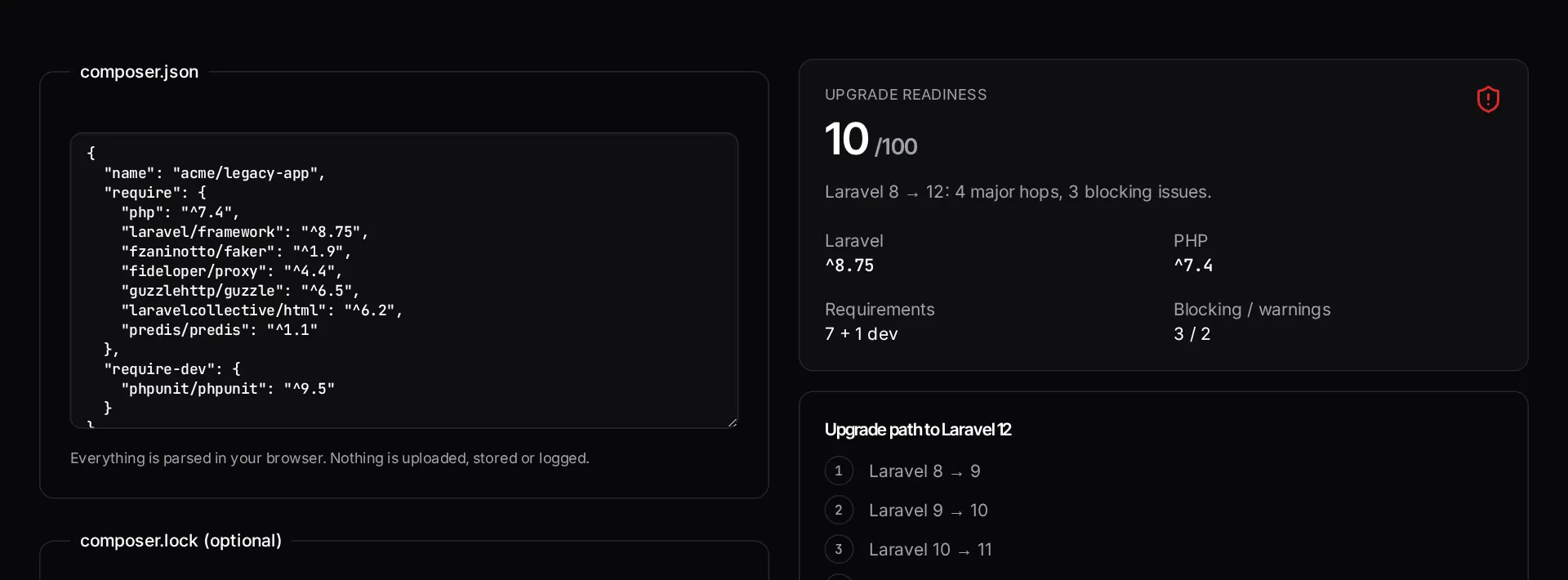
Paste composer.json and composer.lock to see which Laravel and PHP versions you are on, which packages block the upgrade, how many major hops stand between you and Laravel 13, and what to fix first.
About the laravel upgrade readiness scanner
Deciding whether to upgrade a Laravel application usually stalls on one unknown: which dependencies will fight back. This scanner reads your composer.json — and composer.lock if you paste it — and reports the framework and PHP versions you are actually on, how many major hops separate you from Laravel 13, and which packages block the path.
The findings are ordered by severity, because an end-of-life PHP runtime or an abandoned package stops the upgrade before any framework work starts.
When to use it
- You are scoping an upgrade and need to know the size of the job before quoting or committing.
- You are on a Laravel version no longer receiving security fixes and need to justify the work internally.
- You want to know which dependencies to replace first.
- You are comparing an incremental upgrade against a rewrite.
What it does not do
- It reads dependency metadata, not your application code — custom code changes are not detected.
- It cannot see your test coverage, which is the real determinant of how safe an upgrade is.
- It is a triage signal, not a migration plan.
How the result is produced
Constraints in composer.json give the declared versions; composer.lock gives what is actually installed plus Composer's own abandoned-package flags. Major-version distance to the current Laravel release, PHP support status and per-package compatibility combine into a readiness score with a ranked findings list.
For a codebase-level answer — custom code, tests, queues, integrations — a fixed-price triage audit reads the repository itself.
What to watch out for
Framework upgrades stall because the risk is unmeasured, not because the work is inherently hard. Once you know that you are three major versions behind, that four dependencies are abandoned and that the runtime reached end of life eighteen months ago, the conversation changes from whether to upgrade into which order to do it in. That ordering is the useful part of the output.
The correct sequence is almost always the same: get onto a supported PHP version first, replace or remove abandoned packages second, then move the framework one major version at a time, running the test suite at each stop. Attempting a multi-version hop in one commit is how upgrades become rewrites.
The honest limit of any dependency-level scan is that it cannot see your application code or your tests. A codebase with strong coverage upgrades in days; the same dependency profile with no tests can take weeks, because every regression has to be found by hand. If you need that answer, it comes from reading the repository, not the manifest.
Real inputs and the exact output
Every example below was run through this laravel upgrade readiness scanner and copied verbatim.
Example 1: A Laravel 9 app that has not been touched in two years
Security support for Laravel 9 ended; the team wants to know what stands between them and 11.
Abandoned packages, not the framework itself, are what stall most Laravel upgrades. Find them before you plan the sprint.
composer.json (excerpt)
{
  "require": {
    "php": "^8.0",
    "laravel/framework": "^9.19",
    "fideloper/proxy": "^4.4",
    "laravelcollective/html": "^6.3",
    "barryvdh/laravel-debugbar": "^3.6"
  }
}
Scan result
Detected:   Laravel 9.x on PHP ^8.0
Target:     Laravel 11.x (PHP ^8.2 required)
Risk score: 72 / 100 — high

BLOCKERS
  php ^8.0        Laravel 11 requires PHP >= 8.2
  fideloper/proxy Abandoned — merged into the framework since L9
  laravelcollective/html  Abandoned — no L10/L11 release

WARNINGS
  barryvdh/laravel-debugbar  ^3.6 predates L10 support (use ^3.9)
  2 major versions to cross — upgrade 9 -> 10 -> 11, not in one jump

SUGGESTED ORDER
  1. Raise PHP to 8.2 and get the test suite green
  2. Remove fideloper/proxy, use TrustProxies middleware
  3. Replace laravelcollective/html with Blade components
  4. Upgrade to 10.x, then 11.x
How it works
- Paste the contents of your application's composer.json.
- Optionally add composer.lock so the scan reads exact installed versions and Composer's abandoned-package flags.
- Read the readiness score, the major-version hops to Laravel 13 and the findings ordered by severity.
- Fix the blocking findings first — end-of-life PHP and abandoned packages stop the framework hop before it starts.
Frequently asked questions
- Is my composer.json uploaded anywhere?
- No. The file is parsed in your browser with JavaScript and never sent to a server, stored or logged. You can close the tab and nothing is retained.
- Why does it insist on one major version at a time?
- Laravel's own upgrade guides are written per major, and each one lists a distinct set of breaking changes. Jumping several majors in a single commit means debugging every change at once, with no green build to fall back on. Hopping one major at a time keeps the test suite as your safety net.
- Does a good score mean the upgrade is safe?
- It means dependency metadata looks clean. It says nothing about your own code — custom service providers, overridden framework internals, raw queries and untested paths are where upgrades usually hurt. Only reading the repository can tell you that.
- What if composer.lock does not parse?
- The scan continues using composer.json alone and flags the lock file as unreadable. Results are still useful, but version constraints are ranges, so installed versions and abandoned flags are unknown.
Want a person to read the repository?
The $299 Laravel Triage Audit adds a human review on top of this scan: the top five risks, a dependency and version review, and a prioritised upgrade plan you own in writing.
Related free tools
composer.json validator — Check a composer.json for invalid JSON, malformed package names, unbounded version constraints and broken PSR-4 autoload rules before Composer refuses to install.
Laravel version and EOL risk checker — Enter your Laravel and PHP versions to see support status against the published release schedules, how many upgrade hops you are behind, and whether this is a maintenance task or a live security exposure.
Composer dependency conflict decoder — Paste Composer's "Your requirements could not be resolved" output and get the blocking package, the exact `why-not` commands to run, and the order to resolve the conflict in.
All free Dev Loader tools
Every tool below runs entirely in your browser — no account, no upload and no limits. 25 tools in total.
- Software development cost calculator
- Website cost calculator
- App development cost calculator
- Freelance rate calculator
- Cron expression generator
- Meta tag generator
- .htaccess redirect generator
- PHP formatter
- JSON to PHP array converter
- composer.json validator
- PHP version compatibility checker
- URL slug generator
- Unix timestamp converter
- Laravel .env generator
- PHP regex tester
- Laravel migration generator
- Laravel validation rule builder
- Laravel .gitignore generator
- Artisan command cheatsheet
- Carbon date format helper
- Composer dependency conflict decoder
- Laravel failed job decoder
- Laravel Cashier webhook diagnostic
- Laravel version and EOL risk checker
- Free tools hub