Laravel .gitignore generator
Generate a .gitignore that keeps vendor, build output, environment files and tooling caches out of your Laravel repository.
About the laravel .gitignore generator
Committing vendor directories, build output or an environment file is a mistake that is annoying to undo and occasionally a security incident. A correct .gitignore from the first commit avoids both.
This generator starts from the framework defaults and lets you add the rule groups that match your toolchain, so the file covers your editor, your build tooling and your test artefacts rather than only the framework's.
When to use it
- You are starting a repository and want the ignore file right before the first commit.
- You added a build step or a new tool and its artefacts are showing up in diffs.
- You are standardising ignore rules across several projects.
- You are cleaning up a repository that has tracked files it should not.
What it does not do
- It does not untrack files already committed — that needs a git command.
- It does not remove secrets from history.
- Global editor preferences belong in your global gitignore, not the repository's.
How the result is produced
The framework's own ignore rules form the base, and each optional group appends the paths that tool actually produces. Rules are grouped with comments so the file stays maintainable.
What to watch out for
The ignore file is a security control as much as a tidiness one. Environment files, storage directories, key material and local database dumps all live inside a typical project directory, and all of them are one careless add away from being in the history permanently. Getting the file right before the first commit is much cheaper than rewriting history after.
Ignore build output rather than committing it. Compiled assets in version control produce enormous diffs, constant merge conflicts and a repository where nobody can tell whether the committed bundle matches the committed source.
Keep personal editor preferences in your global ignore file. Project ignore files that carry one contributor's editor directories become a mess as soon as the team grows.
If something sensitive has already been committed, the ignore file will not help — git keeps history. Rotate the credential first, on the assumption that it is compromised, then remove the file from tracking, then decide whether rewriting history is worth the disruption for your team. For a private repository with a small team, rotation plus removal is usually enough. For anything that has been public even briefly, treat the value as burned regardless of how quickly it was removed.
Real inputs and the exact output
Every example below was run through this laravel .gitignore generator and copied verbatim.
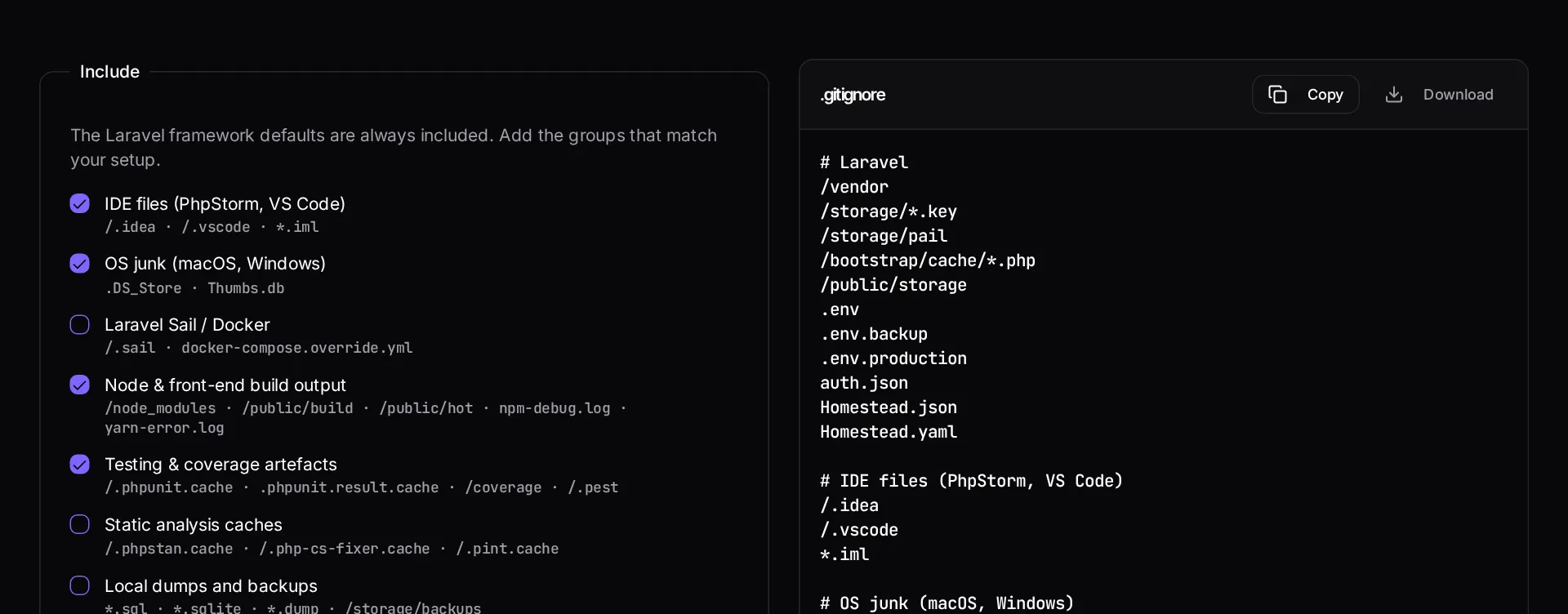
Example 1: Laravel 11 + Vite + PhpStorm on macOS
A fresh repository that must never leak .env or build output.
Ignoring `.env` after it has been committed does nothing — `git rm --cached .env` and rotate every key in it.
.gitignore
# Laravel
/vendor
/node_modules
/public/build
/public/hot
/public/storage
/storage/*.key
/storage/pail
/bootstrap/cache/*.php
.env
.env.backup
.env.production
.phpunit.result.cache
auth.json
Homestead.json
Homestead.yaml

# Vite
/public/build/*
vite.config.js.timestamp-*

# PhpStorm
/.idea
*.iml

# macOS
.DS_Store
How it works
- Start with the Laravel framework defaults, already included.
- Tick the extra rule groups that match your toolchain.
- Copy or download the file into the root of your repository.
Frequently asked questions
- Why is /vendor ignored when the app needs it?
- Because composer.json and composer.lock already describe it exactly. Committing vendor bloats the repository, causes constant merge conflicts, and hides the dependency versions you are actually running. Deployment installs it instead.
- I already committed .env — what now?
- Adding it to .gitignore does not remove it from history. Run `git rm --cached .env`, commit, then rotate every credential that file contained, since it remains readable in previous commits.
- Should /public/build be ignored?
- Yes, if your deploy pipeline runs the Vite build. Only commit compiled assets when you deploy by pulling the repository onto a server with no Node available.
Want a real number instead of an estimate?
A fixed-price Laravel codebase and architecture audit gives you a written scope, a risk list and a delivery date before you commit to a build.
Related free tools
Laravel .env generator — Build a correct .env for local, staging or production — with a freshly generated APP_KEY and the driver settings that match your stack.
composer.json validator — Check a composer.json for invalid JSON, malformed package names, unbounded version constraints and broken PSR-4 autoload rules before Composer refuses to install.
Artisan command cheatsheet — A searchable reference of the Artisan commands you actually use — what each one does, when to reach for it, and the flags worth knowing.
All free Dev Loader tools
Every tool below runs entirely in your browser — no account, no upload and no limits. 25 tools in total.
- Software development cost calculator
- Website cost calculator
- App development cost calculator
- Freelance rate calculator
- Cron expression generator
- Meta tag generator
- .htaccess redirect generator
- PHP formatter
- JSON to PHP array converter
- composer.json validator
- Laravel upgrade readiness scanner
- PHP version compatibility checker
- URL slug generator
- Unix timestamp converter
- Laravel .env generator
- PHP regex tester
- Laravel migration generator
- Laravel validation rule builder
- Artisan command cheatsheet
- Carbon date format helper
- Composer dependency conflict decoder
- Laravel failed job decoder
- Laravel Cashier webhook diagnostic
- Laravel version and EOL risk checker
- Free tools hub