.htaccess redirect generator
Paste a list of old and new URLs and get clean 301 rules for Apache — plus the nginx equivalent, HTTPS and www canonicalisation, and trailing-slash handling.
About the .htaccess redirect generator
Bulk redirects are where site migrations lose their rankings. Typing dozens of rewrite rules by hand invites typos, redirect chains and accidental loops, all of which cost crawl budget and link equity.
Paste your old and new URL pairs and this tool produces a clean rule block for Apache, the nginx equivalent for the same mapping, plus optional HTTPS forcing, www canonicalisation and trailing-slash handling in the correct order.
When to use it
- You are migrating a site and have a mapping spreadsheet to convert into rules.
- You need both Apache and nginx versions because staging and production differ.
- You are consolidating www and non-www, or forcing HTTPS, without creating a double hop.
- You are cleaning up trailing-slash inconsistencies that split the same page across two URLs.
What it does not do
- It does not verify that the destination URLs exist or return 200.
- It does not handle complex conditional rewrites based on headers, cookies or query strings.
- Redirects belong at the edge or in the app for some stacks; a rules file is only one option.
How the result is produced
Each pair becomes a single rule with the chosen status code, ordered so canonicalisation rules run before path-level redirects. That ordering is what keeps every redirect to one hop instead of two.
What to watch out for
Migrations lose rankings for boring reasons: a redirect that lands on another redirect, a rule that redirects to a 404, or a canonicalisation rule placed after the path rules so every request takes two hops. Each hop adds latency and dilutes the signal being passed, and at scale it wastes the crawl budget that would otherwise be spent discovering your new URLs.
Map old to new one URL at a time rather than relying on wildcards wherever you can. A pattern rule that catches ninety percent of a section will also catch the ten percent it should not, and those are precisely the pages you will not notice have broken.
After deploying, verify a sample by requesting each old URL and checking that the response is a single 301 straight to a live 200. Do the same for the www and HTTPS variants — those are the combinations that quietly produce chains.
Real inputs and the exact output
Every example below was run through this .htaccess redirect generator and copied verbatim.
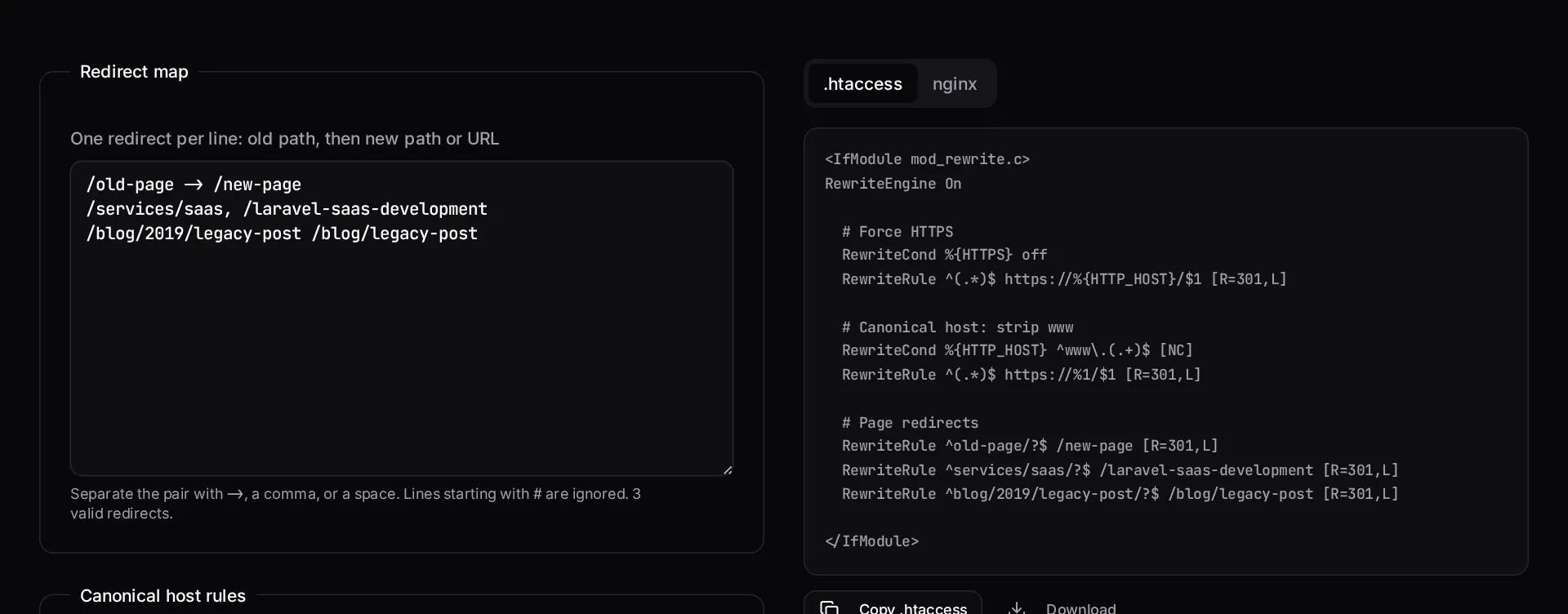
Example 1: Migrating three legacy URLs and forcing HTTPS + non-www
A redesign moved service pages and the old site answered on four host variants.
Host and protocol rules must sit above path rules, otherwise a request gets redirected twice and you build a chain Google has to follow.
Redirect map
/old-page -> /new-page
/services/saas, /laravel-saas-development
/blog/2019/legacy-post /blog/legacy-post
.htaccess
<IfModule mod_rewrite.c>
  RewriteEngine On

  # Force HTTPS
  RewriteCond %{HTTPS} off
  RewriteRule ^(.*)$ https://%{HTTP_HOST}/$1 [R=301,L]

  # Force non-www
  RewriteCond %{HTTP_HOST} ^www\.(.+)$ [NC]
  RewriteRule ^(.*)$ https://%1/$1 [R=301,L]

  # Redirect map
  RewriteRule ^old-page/?$ /new-page [R=301,L]
  RewriteRule ^services/saas/?$ /laravel-saas-development [R=301,L]
  RewriteRule ^blog/2019/legacy-post/?$ /blog/legacy-post [R=301,L]
</IfModule>
Example 2: The same rules for nginx
nginx has no per-directory file — this goes inside the `server` block.
Check with `nginx -t` before `nginx -s reload`. A bad regex takes the whole vhost down, not just the redirect.
redirects.conf
location = /old-page { return 301 /new-page; }
location = /services/saas { return 301 /laravel-saas-development; }
location = /blog/2019/legacy-post { return 301 /blog/legacy-post; }
How it works
- Paste your old and new URL pairs, one per line, separated by a space or comma.
- Choose 301 permanent or 302 temporary, and whether to force HTTPS or a www preference.
- Review the generated rule block and the nginx tab if you are not on Apache.
- Copy into your .htaccess file, then verify each redirect returns a single hop.
Frequently asked questions
- Should I use a 301 or a 302 redirect?
- Use 301 when the move is permanent — it passes ranking signals and search engines eventually drop the old URL. Use 302 only for genuinely temporary situations such as maintenance or A/B tests.
- Why is my redirect causing a loop?
- Almost always because the destination also matches the source pattern. Redirecting `/page` to `/page/` while a separate rule strips trailing slashes is the classic case. Order your rules so canonicalisation happens once, before path-level rules.
- Do redirect chains hurt SEO?
- Yes, mildly but measurably. Each hop adds latency and dilutes crawl efficiency. When you redirect A to B and later B to C, update the first rule to point A directly at C.
- Where does the .htaccess file go?
- In your site's document root, and rules run top to bottom on every request. Put `RewriteEngine On` first, canonicalisation rules next, then specific page redirects. Note that nginx ignores .htaccess entirely — use the nginx tab instead.
Migrating a site without losing rankings?
Redirect maps, canonical handling and sitemap cleanup are part of every migration we run. We document what moved and verify each hop after launch.
Related free tools
Meta tag generator — Generate title, description, canonical, Open Graph and Twitter card tags with live Google and social previews, plus a length check that flags truncation before Google does.
Cron expression generator — Build a crontab expression visually, read it back in plain English, see the next five run times — and get the matching Laravel scheduler code for the same schedule.
URL slug generator — Turn any title into a clean, accent-free URL slug — with optional stop-word removal and a length cap — and see the matching Laravel `Str::slug()` call.
All free Dev Loader tools
Every tool below runs entirely in your browser — no account, no upload and no limits. 25 tools in total.
- Software development cost calculator
- Website cost calculator
- App development cost calculator
- Freelance rate calculator
- Cron expression generator
- Meta tag generator
- PHP formatter
- JSON to PHP array converter
- composer.json validator
- Laravel upgrade readiness scanner
- PHP version compatibility checker
- URL slug generator
- Unix timestamp converter
- Laravel .env generator
- PHP regex tester
- Laravel migration generator
- Laravel validation rule builder
- Laravel .gitignore generator
- Artisan command cheatsheet
- Carbon date format helper
- Composer dependency conflict decoder
- Laravel failed job decoder
- Laravel Cashier webhook diagnostic
- Laravel version and EOL risk checker
- Free tools hub