Laravel version and EOL risk checker
Enter your Laravel and PHP versions to see support status against the published release schedules, how many upgrade hops you are behind, and whether this is a maintenance task or a live security exposure.
About the laravel version and eol risk checker
Support status is a factual question with a published answer, but the dates live in two separate schedules and most teams only look them up after something forces the conversation. This checker puts your Laravel and PHP versions against both schedules at once and gives you a single risk rating for the combination.
The distinction that matters is between bug-fix support and security support. A release that has stopped receiving bug fixes is a planning problem. A release past its security window is a live exposure, and the tool says so in those words rather than calling it technical debt.
When to use it
- You need to justify an upgrade budget to someone who is not going to read an upgrade guide.
- A security questionnaire, an insurance renewal or a customer procurement process asks whether your stack is supported.
- You are scoping a takeover of an inherited application and need to know how many hops it is behind before you quote.
- You want to schedule the upgrade against the next bug-fix cutoff instead of reacting to a disclosed vulnerability.
What it does not do
- It reads versions you type in; it does not scan your repository. The upgrade readiness scanner is the tool for that.
- It does not estimate upgrade effort in hours — effort is driven by test coverage and package sprawl, which no version string reveals.
- It reflects the published upstream schedules at build time; always confirm against the official release pages before making a compliance statement.
How the result is produced
Each version is reduced to its release line — the major for Laravel, the major and minor for PHP — and matched against the published support table. Anything past its security-fix date is end of life, anything past its bug-fix date but inside the security window is security-only, and everything else is active.
The combined risk rating is the worse of the two: either runtime being end of life makes the result critical, both being security-only makes it high, one being security-only makes it moderate. Upgrade hops are enumerated one major at a time up to the current release, each annotated with the minimum PHP that major requires.
Real inputs and the exact output
Every example below was run through this laravel version and eol risk checker and copied verbatim.
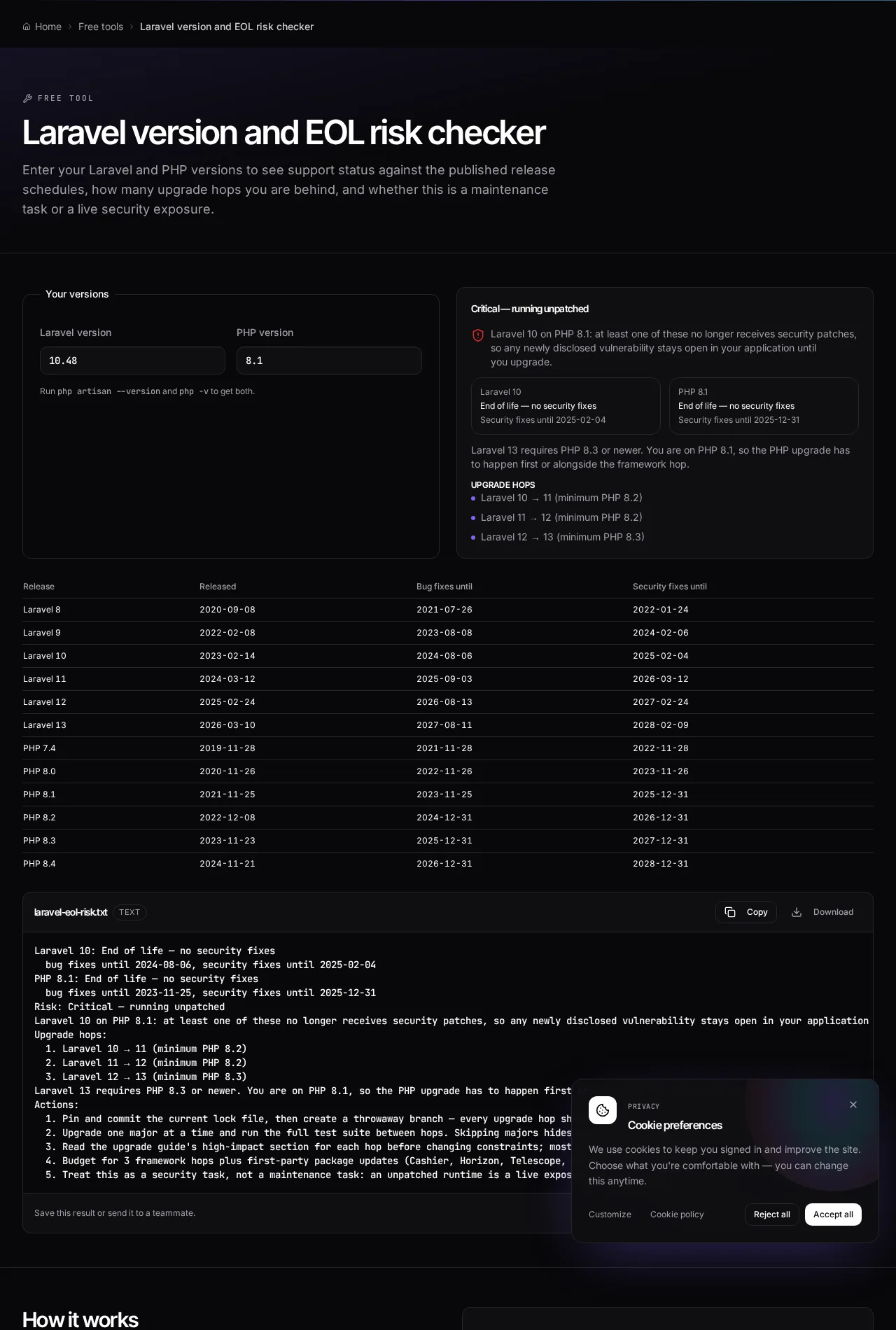
Example 1: Laravel 10 on PHP 8.1 — an unpatched pair
A typical inherited application: last touched in 2024, still running and still taking payments, with both runtimes past their security windows.
Three framework hops with a PHP upgrade in front of them. Raising PHP to 8.3 first is the smaller, independently deployable change, and it unblocks every hop that follows.
Inputs
Laravel version: 10.48
PHP version:     8.1
Assessment
Laravel 10: End of life — no security fixes
  bug fixes until 2024-08-06, security fixes until 2025-02-04
PHP 8.1: End of life — no security fixes
  bug fixes until 2023-11-25, security fixes until 2025-12-31

Risk: Critical — running unpatched

Upgrade hops:
  1. Laravel 10 -> 11 (minimum PHP 8.2)
  2. Laravel 11 -> 12 (minimum PHP 8.2)
  3. Laravel 12 -> 13 (minimum PHP 8.3)
Example 2: Laravel 12 on PHP 8.3 — supported, with a cutoff to plan around
A recently built application checking whether an upgrade needs to be in this quarter's plan.
One hop and no PHP blocker. Scheduling it before the earlier bug-fix cutoff keeps the upgrade a routine sprint task instead of an incident response.
Inputs
Laravel version: 12.20
PHP version:     8.3
Assessment
Laravel 12: Actively supported
  bug fixes until 2026-08-13, security fixes until 2027-02-24
PHP 8.3: Actively supported
  bug fixes until 2025-12-31, security fixes until 2027-12-31

Risk: Low — both runtimes are actively supported

Upgrade hops:
  1. Laravel 12 -> 13 (minimum PHP 8.3)
How it works
- Run `php artisan --version` and `php -v` in your project root.
- Enter both versions — only the major (and PHP minor) matters for support status.
- Read the phase for each: actively supported, security fixes only, or end of life.
- Check the combined risk rating and the number of framework hops between you and the current release.
- Use the support table to schedule the upgrade before the next bug-fix cutoff instead of after an incident.
Frequently asked questions
- How long is a Laravel release supported?
- Laravel provides bug fixes for roughly eighteen months and security fixes for roughly two years from a major release. The exact dates for every release are in the support table on this page, taken from the published Laravel schedule.
- What happens when Laravel reaches end of life?
- No further security patches are published for that release line. Any vulnerability disclosed after that date stays open in your application until you upgrade, and most compliance questionnaires and cyber-insurance renewals now ask about it explicitly.
- Can I skip Laravel major versions when upgrading?
- You can jump the composer constraint directly, but you should not. Upgrading one major at a time with the test suite run between hops tells you which release broke what. Skipping hops turns a sequence of small documented changes into one undiagnosable failure.
- Do I upgrade PHP or Laravel first?
- PHP first, when the PHP version you are on is below the minimum for your target Laravel release. Newer Laravel majors typically still run on the previous PHP minor, so raising PHP is usually the smaller, independently deployable change.
- How long does a Laravel upgrade take?
- It depends far more on test coverage and package sprawl than on the number of hops. A well-tested application with mostly first-party packages moves quickly; an application with no tests and abandoned community packages spends most of the budget replacing those packages, not on the framework itself.
Want a real number instead of an estimate?
A fixed-price Laravel codebase and architecture audit gives you a written scope, a risk list and a delivery date before you commit to a build.
Related free tools
Laravel upgrade readiness scanner — Paste composer.json and composer.lock to see which Laravel and PHP versions you are on, which packages block the upgrade, how many major hops stand between you and Laravel 13, and what to fix first.
PHP version compatibility checker — Paste PHP and see the minimum version it needs, plus every removed or deprecated function that will break on a modern runtime.
Composer dependency conflict decoder — Paste Composer's "Your requirements could not be resolved" output and get the blocking package, the exact `why-not` commands to run, and the order to resolve the conflict in.
All free Dev Loader tools
Every tool below runs entirely in your browser — no account, no upload and no limits. 25 tools in total.
- Software development cost calculator
- Website cost calculator
- App development cost calculator
- Freelance rate calculator
- Cron expression generator
- Meta tag generator
- .htaccess redirect generator
- PHP formatter
- JSON to PHP array converter
- composer.json validator
- Laravel upgrade readiness scanner
- PHP version compatibility checker
- URL slug generator
- Unix timestamp converter
- Laravel .env generator
- PHP regex tester
- Laravel migration generator
- Laravel validation rule builder
- Laravel .gitignore generator
- Artisan command cheatsheet
- Carbon date format helper
- Composer dependency conflict decoder
- Laravel failed job decoder
- Laravel Cashier webhook diagnostic
- Free tools hub