Website cost calculator
Work out what a website really costs in 2026 — from a one-page site to a multi-language marketing platform — with design, build, content and ongoing costs separated out.
About the website cost calculator
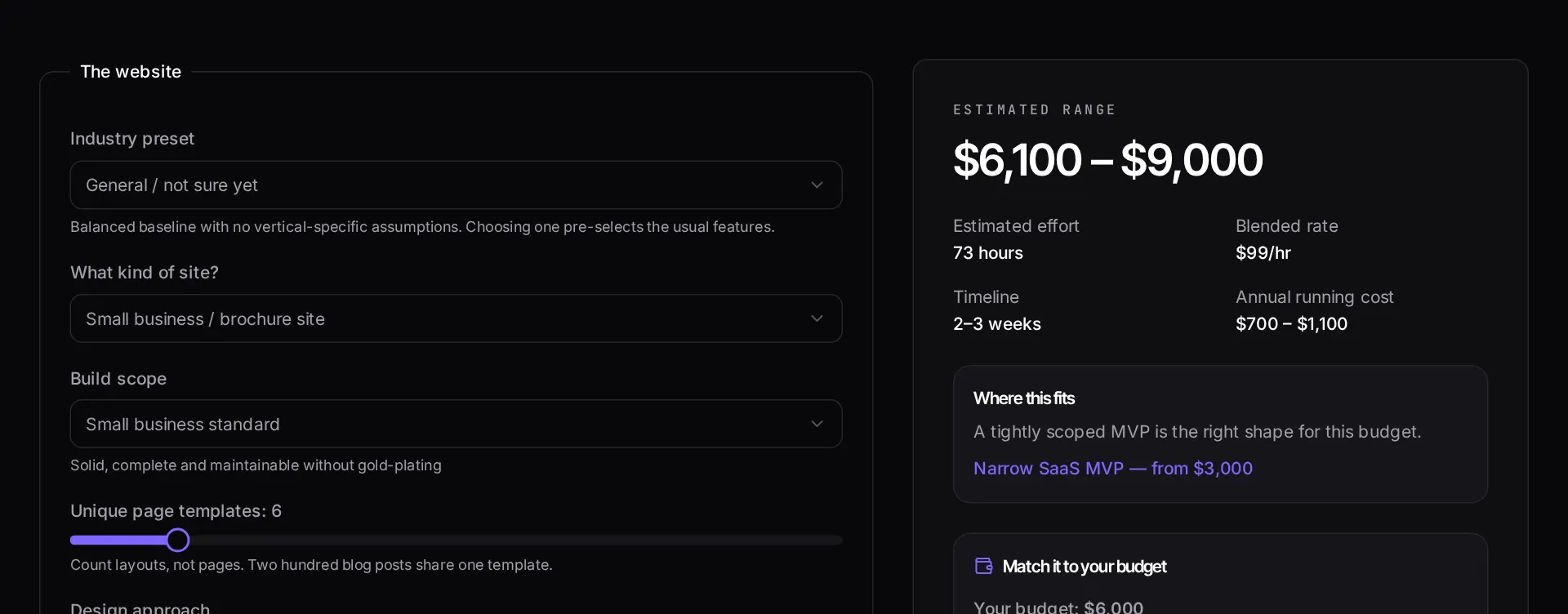
A website can mean a five-page brochure site or a multi-language platform with a CMS, e-commerce and a dozen integrations. This calculator separates those cases by asking how many unique page templates you need, how much of the design is bespoke, and which platform features are actually in scope.
It also splits build cost from running cost. Hosting, CMS licensing, content updates and maintenance are ongoing commitments, and quoting only the build number is how projects end up with an unbudgeted second year.
When to use it
- You are briefing a redesign and need a realistic budget before you approach designers or agencies.
- You want to know what dropping from twelve bespoke templates to six actually saves.
- You are comparing a template-based build against a fully custom design system.
- You need to present both the one-off build cost and the annual running cost to whoever signs off.
What it does not do
- It does not price content writing, photography or video production beyond a nominal allowance.
- It does not estimate SEO retainers, paid media or ongoing conversion work.
- Very large platform migrations, where the work is data and redirects rather than pages, need a scoped audit instead.
How the result is produced
The build range is driven by the number of unique templates rather than the number of pages, because a hundred pages sharing four templates costs far less than twenty pages that are all different. Bespoke design, CMS integration, e-commerce and multi-language each add their own hour block.
Annual running cost is estimated from hosting tier, CMS choice and an assumed level of monthly content and maintenance work.
What to watch out for
Template count, not page count, is the number that drives a website budget. A site with two hundred pages built from six templates is a smaller job than a twenty-page site where every page is a bespoke layout, because design and front-end work scale with unique layouts while content scales with, well, content. When an agency asks how many pages you need and you answer with a number, you are usually answering the wrong question.
The second thing that moves the total is where content comes from. If you have final copy and imagery, the build is predictable. If content will be written during the build, expect layout churn, because copy length changes design. Budgeting a content phase before design starts is consistently cheaper than discovering it mid-build.
Do not skip the running-cost figure. Hosting, a CMS licence, plugin renewals, accessibility fixes and a modest monthly allowance for content changes are real. Sites that were built well and then left untouched for three years are among the most common reasons a redesign becomes necessary earlier than it should.
Real inputs and the exact output
Every example below was run through this website cost calculator and copied verbatim.
Example 1: Eight-page marketing site for a law firm
Custom design, blog with a CMS, contact and intake forms, basic on-page SEO.
A CMS is the single biggest jump on a brochure site — it turns static pages into editable models, templates and preview states.
Inputs
Pages:        8
Design:       Custom (not a template)
CMS:          Yes — blog + practice areas
Forms:        2 (contact, case intake)
SEO:          On-page basics
Ecommerce:    No
Estimate
Range:      $3,200 – $5,400
Design      $1,100 – $1,900
Build       $1,500 – $2,600
Content/SEO   $400 – $700
Timeline:   2 – 3 weeks
How it works
- Pick the kind of website you need and roughly how many unique page templates it has.
- Set how much of the design is bespoke versus adapted from a system.
- Add the extras that change the build: CMS, e-commerce, multi-language, integrations.
- Review the build range and the separate annual running-cost estimate.
Frequently asked questions
- How much does a website cost in 2026?
- A single-page site built on an existing design system sits in the low thousands. A bespoke multi-template marketing site with a CMS typically lands in the mid five figures. E-commerce and multi-language requirements push it higher because each one multiplies the number of states that must be designed, built and tested.
- Why do quotes for the same brief vary so much?
- Different studios include different things. One price may cover design only; another includes content migration, SEO setup, analytics, accessibility testing and a year of hosting. Compare the deliverable lists, not the totals.
- What are the ongoing costs after launch?
- Hosting, domain, email, any SaaS the site depends on, plus a maintenance allowance for dependency and security updates. The calculator estimates these separately so you can budget them properly instead of discovering them in month two.
- Is a template cheaper than a custom build?
- Up front, yes. Over three years it depends. Templates are cheapest when your content fits the template's structure. If you spend the build fighting the template to fit your content, you pay the difference back in workarounds and slower iteration.
Want a real number instead of an estimate?
A fixed-price Laravel codebase and architecture audit gives you a written scope, a risk list and a delivery date before you commit to a build.
Related free tools
Software development cost calculator — Estimate what a custom software build costs before you talk to anyone — pick your features, team model and region, and get a low-to-high range with the phase breakdown behind it.
App development cost calculator — Estimate iOS, Android and cross-platform app costs — including the backend, store submission and the first year of maintenance most calculators leave out.
Meta tag generator — Generate title, description, canonical, Open Graph and Twitter card tags with live Google and social previews, plus a length check that flags truncation before Google does.
All free Dev Loader tools
Every tool below runs entirely in your browser — no account, no upload and no limits. 25 tools in total.
- Software development cost calculator
- App development cost calculator
- Freelance rate calculator
- Cron expression generator
- Meta tag generator
- .htaccess redirect generator
- PHP formatter
- JSON to PHP array converter
- composer.json validator
- Laravel upgrade readiness scanner
- PHP version compatibility checker
- URL slug generator
- Unix timestamp converter
- Laravel .env generator
- PHP regex tester
- Laravel migration generator
- Laravel validation rule builder
- Laravel .gitignore generator
- Artisan command cheatsheet
- Carbon date format helper
- Composer dependency conflict decoder
- Laravel failed job decoder
- Laravel Cashier webhook diagnostic
- Laravel version and EOL risk checker
- Free tools hub