composer.json validator
Check a composer.json for invalid JSON, malformed package names, unbounded version constraints and broken PSR-4 autoload rules before Composer refuses to install.
About the composer.json validator
A composer.json can be perfectly valid JSON and still break the install: a vendor name with the wrong case, a constraint with no upper bound, or a PSR-4 rule pointing at a directory that does not exist. Those failures usually surface in CI, minutes after you pushed.
This validator checks the file the way Composer will, and groups what it finds into errors that will stop an install, warnings that will bite later, and notes worth knowing.
When to use it
- An install works locally and fails in CI and you want to rule out the manifest.
- You are auditing a project you have just inherited.
- You are tightening unbounded constraints before an upgrade.
- You are adding autoload rules and want them checked before you commit.
What it does not do
- It does not resolve dependencies or detect version conflicts — only Composer can do that.
- It does not check whether packages exist on Packagist.
- It does not audit for known vulnerabilities.
How the result is produced
The document is parsed, then checked against Composer's schema expectations: required fields, vendor/package name rules, constraint syntax and bounds, autoload path shapes and script definitions. Findings are ranked by whether they break the install or merely make it fragile.
What to watch out for
Unbounded version constraints are the finding worth acting on even when everything currently installs. A dependency declared with no upper bound will eventually pull a major release with breaking changes into a build that previously passed, and the failure will arrive on a day you were doing something else. Constraining to a major version keeps upgrades deliberate.
PSR-4 autoload rules are the other quiet failure. A namespace mapped to a directory that has been renamed will resolve fine as long as the class is also reachable through the classmap, and will break the moment it is not. Validating the manifest catches it before a deploy does.
Manifest validity is a precondition, not a guarantee. A file with no errors here can still fail to resolve because two packages want incompatible versions of a third. That answer only comes from running the resolver.
One more habit prevents most manifest problems: commit the lock file, and treat it as the source of truth for what is installed. The manifest describes intent, the lock describes reality, and CI should install from the lock so every environment runs identical code. Teams that gitignore the lock file get builds that pass on Monday and fail on Thursday because a transitive dependency published a patch release in between. When you do want new versions, update deliberately, read what changed, and let the resulting lock diff be part of the review rather than a surprise in production.
Real inputs and the exact output
Every example below was run through this composer.json validator and copied verbatim.
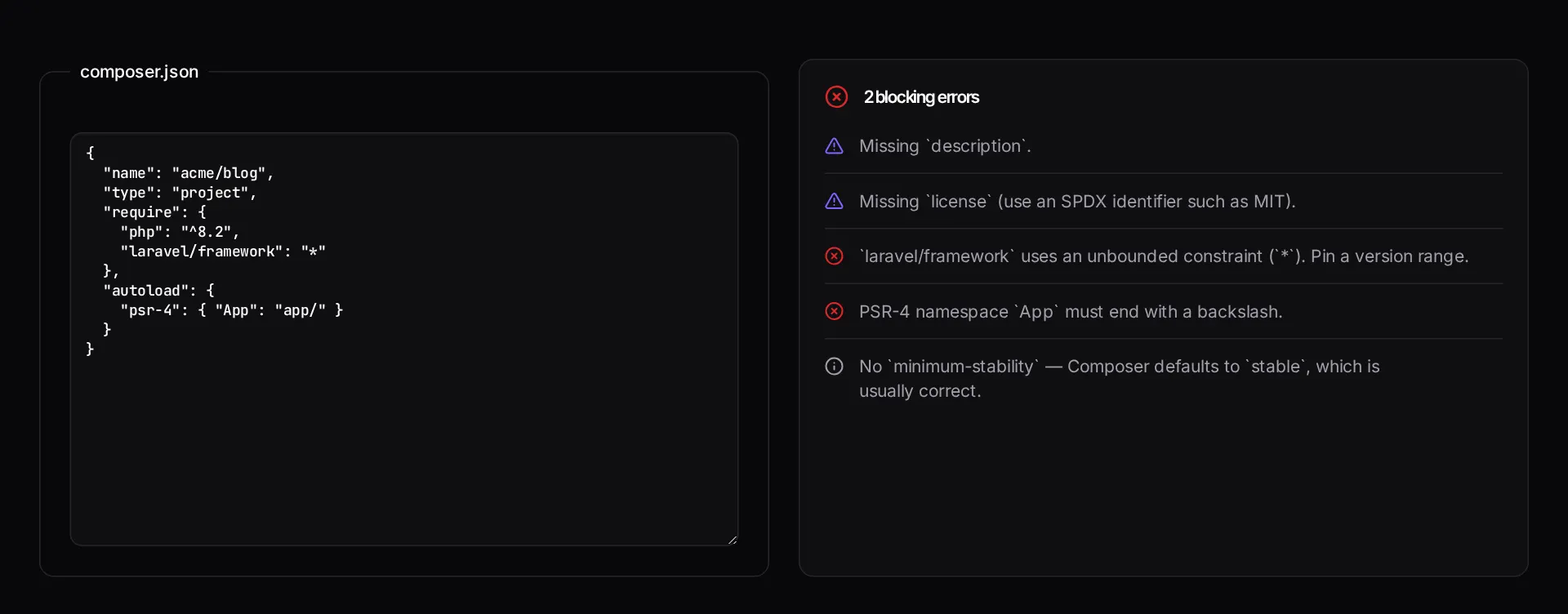
Example 1: A composer.json with a wildcard constraint and a missing license
The file parses as JSON but will bite you on the next `composer update`.
`*` and `dev-master` are how a working deploy becomes a broken one six months later. Pin to a caret range on a released version.
composer.json (excerpt)
{
  "name": "acme/portal",
  "require": {
    "php": "*",
    "laravel/framework": "^11.0",
    "guzzlehttp/guzzle": "dev-master"
  }
}
Findings
ERROR   "license" is missing — required for public packages
WARN    php: "*" allows any version, including PHP 5.x
        suggested: "^8.2"
WARN    guzzlehttp/guzzle: "dev-master" is unstable
        suggested: "^7.8"
INFO    no "minimum-stability" set — defaults to "stable"
How it works
- Paste the contents of your composer.json.
- Read the findings, grouped into errors, warnings and informational notes.
- Fix the errors first — those are what break `composer install` in CI.
Frequently asked questions
- What does this check that `composer validate` does not?
- It overlaps heavily, but runs instantly in the browser with no PHP installed — useful when reviewing a package on a machine that is not set up, or checking a snippet from a pull request. For authoritative results in CI, keep running `composer validate --strict`.
- Why is a wildcard version constraint flagged as an error?
- `"*"` lets Composer install any release, including the next major version with breaking changes. Builds that passed last week then fail with no code change. Pin a caret range such as `^11.0` so upgrades are deliberate.
- Do PSR-4 namespaces really need a trailing backslash?
- Yes. `"App\\": "app/"` is required; without the trailing separator Composer's autoloader will not map the namespace and every class in it fails to resolve at runtime.
Dependencies drifted years behind?
A Laravel upgrade service moves you to a supported framework and PHP version with a tested, staged plan rather than one risky big-bang release.
Related free tools
Composer dependency conflict decoder — Paste Composer's "Your requirements could not be resolved" output and get the blocking package, the exact `why-not` commands to run, and the order to resolve the conflict in.
PHP version compatibility checker — Paste PHP and see the minimum version it needs, plus every removed or deprecated function that will break on a modern runtime.
Laravel version and EOL risk checker — Enter your Laravel and PHP versions to see support status against the published release schedules, how many upgrade hops you are behind, and whether this is a maintenance task or a live security exposure.
All free Dev Loader tools
Every tool below runs entirely in your browser — no account, no upload and no limits. 25 tools in total.
- Software development cost calculator
- Website cost calculator
- App development cost calculator
- Freelance rate calculator
- Cron expression generator
- Meta tag generator
- .htaccess redirect generator
- PHP formatter
- JSON to PHP array converter
- Laravel upgrade readiness scanner
- PHP version compatibility checker
- URL slug generator
- Unix timestamp converter
- Laravel .env generator
- PHP regex tester
- Laravel migration generator
- Laravel validation rule builder
- Laravel .gitignore generator
- Artisan command cheatsheet
- Carbon date format helper
- Composer dependency conflict decoder
- Laravel failed job decoder
- Laravel Cashier webhook diagnostic
- Laravel version and EOL risk checker
- Free tools hub