Supabase vs Firebase: A SaaS Founder’s Guide (2026)
A senior engineer’s comparison of Supabase and Firebase for SaaS founders — data model, Next.js DX, scaling costs, migrations, and when each wins.
Choosing your backend-as-a-service (BaaS) is one of the highest-leverage decisions a SaaS founder makes in the first ninety days. Get it right and you compound velocity for years: schema changes ship in minutes, auth "just works", and your bill grows in a line you can predict. Get it wrong and you spend the next twelve months either fighting your data model, patching around vendor limits, or planning a rewrite while investors ask why the roadmap slipped.
The two names that come up in nearly every stack conversation we have at Dev Loader LLC are Supabase and Firebase. Both promise to remove backend toil. Both ship auth, storage, real-time, and serverless functions. Both plug beautifully into a Next.js frontend. And yet, once you have real customers, the two feel radically different — because underneath the marketing, they are built on very different bets about how modern applications should be modeled.
This guide is the conversation we have with founders every week, written down. It compares Supabase and Firebase across the dimensions that actually decide the outcome of a SaaS: the data model, the developer experience with Next.js, scaling costs, the escape hatches, and the total cost of ownership over 24 months. We build production apps on both — and we have opinions — but the goal here is to give you a decision framework, not a fanboy pitch. By the end, you will know which one fits *your* SaaS, and where the sharp edges are.
TL;DR — the 60-second verdict
If you are a B2B SaaS, developer tool, or data-heavy product with relational entities (users, teams, projects, invoices, permissions), pick Supabase. Postgres is the right substrate. Row-Level Security lets you enforce multi-tenancy in the database instead of the app. You keep every escape hatch — you can leave Supabase without leaving Postgres.
If you are a consumer mobile app, a real-time collaboration toy, or an MVP where you have not yet earned the right to worry about your database schema, pick Firebase. Firestore's document model, offline sync on iOS/Android, and the batteries-included Google Analytics/Cloud Messaging tooling ship a product faster.
For most 2026 SaaS founders we advise, Supabase wins — because the moment you sell to your third customer, you need reporting, exports, joins, and an audit trail. Firestore can be made to do those things. Postgres was built for them.
The rest of this article is why.
Two different bets on the shape of an app
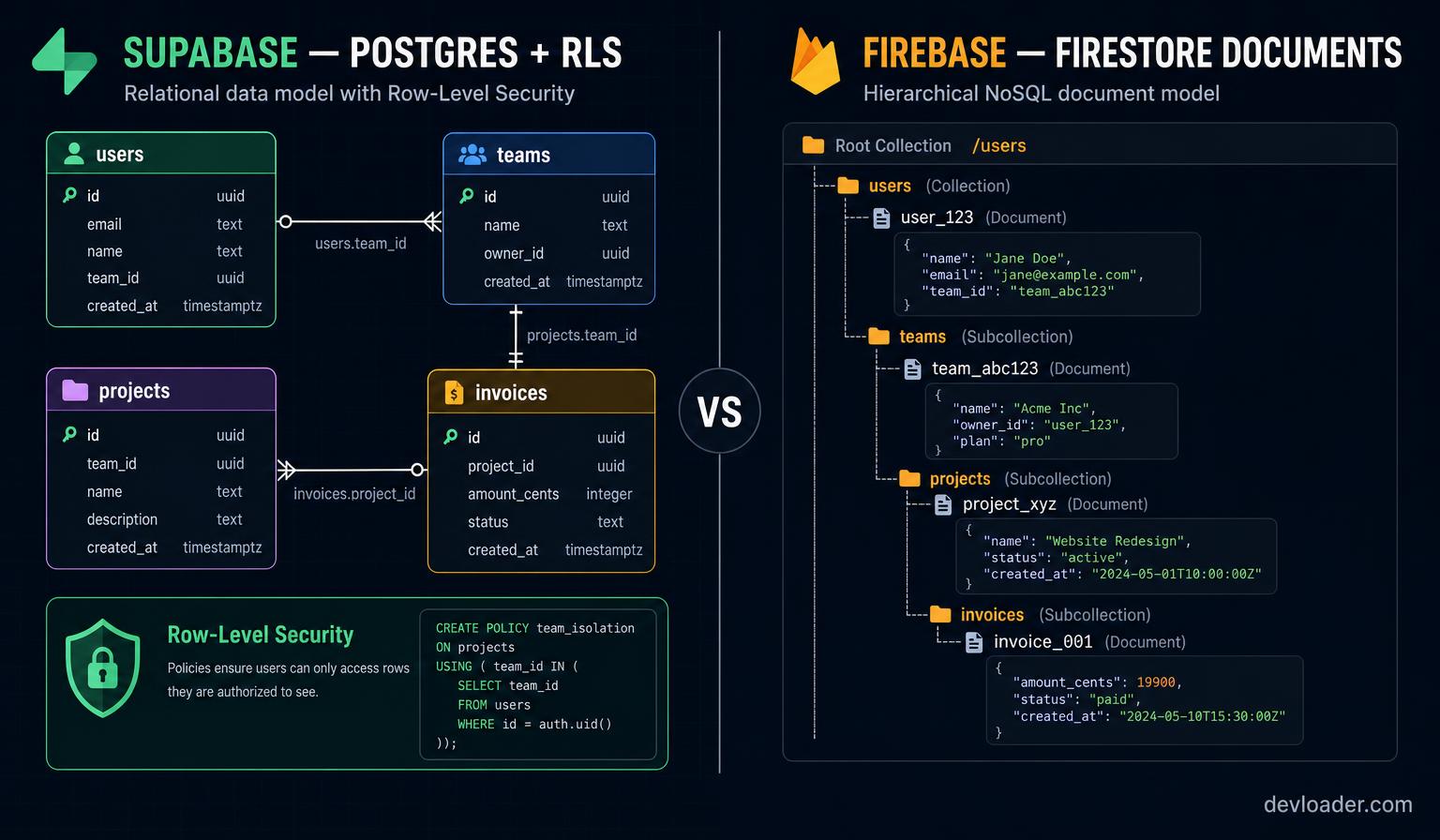
Firebase (acquired by Google in 2014) started as a real-time sync engine. Its central abstraction — a JSON document tree that clients subscribe to — was radical in 2012 and is still lovely for the class of apps it was designed for: chat, live scoreboards, whiteboards, presence, mobile-first consumer products. Around that core, Google layered Firebase Auth, Cloud Functions, Cloud Storage, Hosting, Analytics, Crashlytics, App Check, Remote Config, and (in 2024) Data Connect — a managed Postgres offering that quietly acknowledges the pull we are about to describe.
Supabase (2020) started with the opposite bet: the best backend already exists, and it's Postgres. Everything Supabase ships is a thin, opinionated layer *on top* of an ordinary Postgres database — PostgREST for auto-generated APIs, GoTrue for auth, Realtime for logical-replication websockets, Storage as an S3-compatible object service, and Edge Functions running on Deno. You can psql into your database at any time. You can pg_dump and walk away.
That difference — a proprietary document store vs. an open relational database — shows up in every meaningful decision that follows. It is not "NoSQL vs SQL" trivia; it is the difference between building on a platform you rent and building on infrastructure you can eventually own.
Data model: Postgres vs Firestore in practice
The most common regret we hear from founders migrating *off* Firestore is the same sentence, almost verbatim: *"I didn't realize how much of my product would be aggregations and joins."*
Firestore is a document database. Reads are cheap and scalable when you fetch a document by ID. They become expensive — in money and in code — the moment you need to answer questions like *"show me all invoices over $500 from customers in the EU whose plan renewed this month, grouped by owner."* You end up denormalizing aggressively (writing the same field into three collections), maintaining Cloud Function fan-outs to keep denormalizations in sync, and shipping reporting through BigQuery exports because the source database can't answer the question.
Postgres answers that question with SELECT and a JOIN. When you outgrow raw SQL, you reach for materialized views, pg_stat_statements, partial indexes, EXPLAIN ANALYZE. Twenty years of tooling is waiting for you.
Concrete comparison of the same feature — *"list the top 10 accounts by MRR this quarter, with their owner's name and last activity date"*:
Firestore: three collections (accounts, subscriptions, activity), one Cloud Function trigger to precompute an accounts_mrr_summary document on every write, a scheduled function to recalculate the quarter window, custom composite indexes, and a client query that stitches results together. Every schema change triggers a backfill script.
Supabase: one SQL query with a JOIN and ORDER BY, wrapped in a Postgres view. Add an index on (quarter, mrr DESC). Done. If it gets slow at 10M rows, promote the view to a materialized view refreshed hourly. If it gets slow at 100M rows, partition by quarter.
The Firestore version is not *wrong* — it is what Google recommends and it scales beautifully once built. But it is meaningfully more code, and every one of those lines is code *your* team writes and maintains. Supabase lets you spend that headcount somewhere else.
Authentication and multi-tenancy
Both platforms ship excellent auth. Firebase Auth is a mature, hardened service with providers for Google, Apple, GitHub, phone, anonymous, and a well-regarded mobile SDK that includes account linking, MFA, and reCAPTCHA-Enterprise-based abuse protection. Supabase Auth (based on the GoTrue project) covers the same major providers, adds SAML SSO on paid tiers, and integrates natively with Row-Level Security.
The interesting divergence is how the auth system reaches into your data.
In Firebase, permissions live in firestore.rules — a JavaScript-flavored DSL you author, deploy, and test separately from your database. Rules are powerful but they are their own runtime: you learn a new syntax, wire up an emulator, and remember that a mistake in the rules file is a data breach.
In Supabase, permissions live in your database as Row-Level Security (RLS) policies written in SQL. The user's JWT is available as auth.uid(). A policy like *"a user can only read invoices for accounts they belong to"* is one CREATE POLICY statement. Because the enforcement happens in Postgres, every access path — the REST API, direct SQL from an Edge Function, a scheduled job, a data-analyst SQL query — is gated by the same rules. There is no "forgot to check permissions in the new endpoint" bug class.
For B2B SaaS with team accounts, tenant isolation, and role hierarchies, this is decisive. We build almost every multi-tenant Supabase project with the pattern: a user_roles table, a has_role(user_id, role) SECURITY DEFINER function, and RLS policies that read has_role(auth.uid(), 'admin'). It fits on one screen and it is bulletproof.
Firestore's document-scoped rules can express similar policies, but they get verbose fast, they cannot easily express "user belongs to org via a join table", and the analyst who wants to run a one-off report has to route through your app code — a real productivity tax as you grow past ten engineers.
Real-time — the ironic reversal
Firebase invented mainstream real-time. So it is genuinely surprising, in 2026, to say that Supabase's real-time story is now equally good for most SaaS use cases — and better for some.
Supabase Realtime ships three channels: Postgres Changes (subscribe to INSERT/UPDATE/DELETE on any table, filtered by RLS), Broadcast (arbitrary websockets, great for cursors and presence), and Presence (typing indicators, online users). Because Postgres Changes flows through logical replication, you get "listen to any table" for free the moment you enable it — no Cloud Function fan-outs, no explicit publish step.
Firestore's real-time is still slightly more polished on the client SDK side, especially for mobile — the offline cache, conflict resolution, and eventual-consistency semantics are genuinely great for a chat app or a mobile whiteboard. But for the classic SaaS pattern (dashboard updates when a teammate edits a record, live notifications, real-time metric tiles), Supabase now covers 95% of what you need with less code.
Where Firestore still wins clearly: offline-first mobile. If you are building an iOS or Android app that must work on a subway train, Firestore's cache and sync are best-in-class and worth the tradeoffs.
Serverless functions
Firebase Cloud Functions run on Node.js (v22 on 2nd gen) on Google Cloud Functions or Cloud Run. They are mature, they scale from zero, and the toolchain is deeply integrated with GCP — Cloud Scheduler, Cloud Tasks, Pub/Sub, Eventarc, Secret Manager. If your product needs to hang off the wider Google Cloud ecosystem (Vertex AI, BigQuery, Cloud Storage triggers), the ergonomics are unmatched.
Supabase Edge Functions run on Deno at the edge (Cloudflare-style). They are TypeScript-first, cold starts are measured in tens of milliseconds, and they have first-class access to your Postgres database through the service role key. The Deno runtime rules out a chunk of Node ecosystem quirks and forces you to import modules by URL — usually a good thing, occasionally annoying when a niche package assumes Node.
For most SaaS workflows — webhook receivers, Stripe/paddle handlers, AI proxying, scheduled jobs, cron triggers via pg_cron — Edge Functions are lean and fast. For heavy Google-ecosystem workflows or long-running (>60s) jobs, Firebase 2nd gen functions on Cloud Run still have the edge.
Storage
Both platforms ship an object store: Firebase Cloud Storage is a Google Cloud Storage bucket with Firebase security rules on top; Supabase Storage is S3-compatible with RLS policies on top. Feature-wise they are near-parity — signed URLs, transformations (Supabase has native image transforms; Firebase leans on Cloud CDN + a Cloud Function), and public/private buckets.
The differentiator, again, is the policy language. Supabase Storage policies are SQL against the storage.objects table. If your existing RLS mental model is *"users can only touch files where bucket_id = 'invoices' AND (storage.foldername(name))[1] = auth.uid()::text"*, that is a two-line policy. No new DSL, no separate deploy pipeline.
Scaling costs — the surprise line item
Cost is where the marketing pages become useless and lived experience matters. We have run identical workloads on both and here is what we have consistently seen for a SaaS in the $0–$500K ARR window (the range most of our clients live in):
Firebase shines from $0 to about $2K/month. The Spark (free) tier is generous, Firestore document reads at 50K/day free covers a real prototype, and Cloud Functions have a free tier. Then something happens: your product gets traction, your dashboard makes 40 reads per pageview across five collections, and your bill goes from $200 to $2,400 in a month. Firestore's cost model — you pay per document read, write, and delete — is exquisitely honest but ruthless when your access pattern is "load a page that shows 200 items with 3 sub-collection fetches each."
Supabase is more predictable. You pay for a compute size ($25/mo Pro, then tiered Micro→XL), for database storage, for bandwidth, and for edge function invocations. A B2B SaaS with 10K MAU typically runs $100–$400/month all-in through the low six-figure ARR range. The failure mode is different: your Pro plan compute gets saturated by a bad query and you need to scale up ($60→$110→$210), which is a decision you make quarterly, not a surprise you find on the 5th of next month.
Two rules of thumb we give founders:
- If your product looks like "users load lots of small documents, occasionally" (a consumer app, a mobile client, a real-time board): Firestore's per-operation pricing is fine and often cheap.
- If your product looks like "users load big joined tables, constantly" (a dashboard, an admin panel, a reporting tool, a marketplace): Postgres with a fixed compute bill will be *substantially* cheaper past $500 MRR of usage, because you're serving a lot of value out of one indexed query instead of hundreds of individually-priced reads.
We keep a rough model that says: at 100K monthly active users on a dashboard-style product, expect Firestore to cost 3–8× more than an equivalently-sized Supabase Pro deployment. Your mileage will vary — but it will not be lower.
Developer experience with Next.js
Because we ship most of our client work on Next.js 15 (App Router, React Server Components), this is not a hypothetical for us — it is what our engineers do every day.
Firebase + Next.js is a well-worn path. firebase-admin on the server, the modular v9+ SDK on the client, Firebase Hosting or Vercel for deployment. Auth cookies via next-firebase-auth or the firebase/auth SDK with manual cookie plumbing. Server components can read Firestore with the Admin SDK, client components use the web SDK with real-time subscriptions. It works. There are, however, sharp edges: the Admin SDK is heavy (bundle bloat if you're not careful with route boundaries), and reconciling client-side listeners with RSC's server-first rendering is a genuine architectural puzzle.
Supabase + Next.js feels, in 2026, like the intended combination. The @supabase/ssr package handles cookie-based auth across Server Components, Route Handlers, Middleware, and Server Actions with a single mental model. supabase.from('table').select() returns typed results (if you run supabase gen types typescript), and every row goes through RLS regardless of who is querying — server, client, or edge function. When you want a real-time subscription, you do it in a Client Component and it is three lines.
The subjective experience most of our engineers report: you write less code with Supabase + Next.js, and the code you write feels like modeling your domain instead of shepherding data between two services.
That said, Firebase's iOS and Android SDKs are still the best in the world at what they do. If your Next.js app is going to be joined by a first-class native mobile client, Firebase's offline sync and Cloud Messaging are worth serious consideration even if the web experience is a shade less elegant.
Vendor lock-in and the escape hatch
Every founder should ask, on day one: if this platform disappoints me in three years, how do I leave?
Leaving Firestore means writing a migration script that walks the document tree, transforming JSON documents into rows in a relational database, and rebuilding every rule and Cloud Function trigger in your target stack. It is a real, expensive project. We have quoted several — they typically cost more than the original build.
Leaving Supabase means pg_dump, pg_restore, and pointing your Next.js app at a different Postgres host — Neon, RDS, Fly, your own DigitalOcean droplet. Your RLS policies come with. Your Edge Functions may need to be rewritten as Cloudflare Workers or Vercel Functions (a day of work), and your auth provider may change. But your *data* moves in one command.
This is not theoretical. In the last twelve months at Dev Loader LLC we have helped two clients leave Supabase (both for enterprise procurement reasons that had nothing to do with the platform) and one client migrate off Firestore. The Supabase migrations took a combined ten engineer-days. The Firestore migration took two months.
When Firebase is still the right call
We are not writing a Supabase advertorial. There are honest scenarios where Firebase is the better choice:
- A consumer or prosumer mobile app where offline is a hard requirement and the primary interface is iOS or Android. Firestore's client SDKs remain unmatched.
- A product where real-time and presence are the core value — collaborative canvases, live multiplayer games, live event experiences. Firebase's mature client cache and conflict resolution save months.
- A team already fluent in Google Cloud who wants tight integration with Vertex AI, BigQuery, Pub/Sub, and Cloud Scheduler. The GCP synergy is real.
- An MVP where you genuinely do not know your schema and expect it to change every week. Document databases forgive that; relational schemas punish it. (Caveat: Supabase migrations are lightweight enough that we usually still pick it, but it is a defensible call.)
- Push notifications at scale — Firebase Cloud Messaging is best-in-class and integrates cleanly with the rest of the platform. Supabase leaves push to third parties.
When Supabase is the better call
- Multi-tenant B2B SaaS — RLS makes tenant isolation a database concern, not an application concern.
- Data-heavy products — reporting, analytics, admin panels, marketplaces, anything with joined tables and aggregations.
- AI-native products —
pgvectorships in Supabase Postgres. You can store embeddings next to your primary data and run RAG queries without a second vector database. This is how we build our internalblog-auto-internal-linksfunction on devloader.com. - Teams that value ownership — you can leave with your data intact, hire Postgres DBAs from any city, and read twenty years of documentation for the underlying database.
- Cost-sensitive scaling — the fixed compute + storage bill is easier to reason about and typically cheaper past product-market fit.
How Dev Loader LLC uses Supabase in production
We should show our work. Every project we ship — this website included — runs on Supabase. A typical Dev Loader SaaS stack looks like:
- Next.js 15 on Vercel with the App Router, React Server Components, Server Actions.
- Supabase Postgres with RLS on every user-facing table, a
user_rolestable with ahas_role()SECURITY DEFINER function, andpg_cronfor scheduled jobs. - Supabase Auth with email + Google OAuth, MFA for admin accounts.
- Supabase Edge Functions for Stripe webhooks, AI proxying (via the Lovable AI Gateway), transactional email, and anything that needs a service-role key.
- Supabase Storage for user uploads and generated OG images.
- Supabase Realtime for dashboard notifications and in-app chat.
The result is a stack that a two-person team can ship on Monday and a fifteen-person team can scale to seven-figure ARR without a rewrite. If you want to see the pattern in action, our Web Application Development and Custom SaaS engagements are built exactly this way.
If you already have a Firebase project and you are outgrowing it, our team has done the migration several times — we can scope a Firestore-to-Postgres migration in a two-hour call. If you are starting from zero, we can ship your SaaS MVP in seven days on the Supabase + Next.js stack described above.
Frequently asked questions
Is Supabase really "just Postgres"?
Yes — meaningfully so. Supabase is Postgres plus PostgREST for auto-generated REST/GraphQL APIs, GoTrue for auth, a Realtime service reading logical replication, Storage as an S3-compatible layer, and Deno Edge Functions. You can connect any Postgres client (psql, DBeaver, TablePlus, Prisma, Drizzle, an ORM) to a Supabase database. That "just Postgres" property is what makes the escape hatch real.
Is Firebase Data Connect an answer to Supabase?
Data Connect (Google's 2024 managed Postgres offering wrapped in a Firestore-flavored SDK) is a strong signal that the market wants relational databases with modern DX. It is worth watching. In 2026 it is still newer and less mature than Supabase — thinner ecosystem, fewer production case studies, and no equivalent to RLS-driven multi-tenancy. If you are already all-in on Firebase and you want relational, it is a reasonable next step. If you are choosing greenfield, Supabase is further along.
Can I use both?
Yes, and we sometimes do. A common pattern: Supabase as the primary transactional database and auth, Firebase Cloud Messaging for mobile push notifications. Another: Firebase for the mobile app's offline cache, Supabase for the web dashboard and admin panel, with data sync via webhooks or Change Data Capture. It is more moving parts, but if you need the strengths of both, it is defensible.
Which is faster to prototype in?
For a mobile-first MVP or a real-time toy, Firebase is faster — the SDKs are more turnkey and you can go from zero to "logged-in user reading live data" in an afternoon. For a web SaaS with any data model complexity, Supabase is faster because you skip the schema-denormalization thinking that Firestore forces on you.
What about vendor pricing changes?
Both platforms have raised prices in the last three years. Google has meaningfully increased Firestore and Cloud Functions pricing for high-volume workloads. Supabase has restructured its Pro plan tiers. This will keep happening. The only real hedge is portability — which, again, favors Supabase for the reasons above.
Do you help teams migrate from Firebase to Supabase?
Yes — it is one of our most-requested engagements in 2026. We scope migrations in three phases: (1) data model translation, (2) auth cutover with a two-week dual-write window, (3) Cloud Function to Edge Function port. Most SaaS migrations take 3–8 weeks depending on Cloud Function complexity. Get a quote.
What about compliance — SOC 2, HIPAA, GDPR?
Both platforms are SOC 2 Type II certified. Firebase has broader compliance surface (HIPAA-eligible services under a BAA on GCP). Supabase offers HIPAA on the Team and Enterprise plans and is used in healthcare production. For GDPR, both are workable; Supabase's EU regions and the ability to pg_dump for data-portability requests are conveniences.
The bottom line
If we were starting a SaaS today, on a Next.js frontend, targeting founders, developers, or any B2B buyer — we would pick Supabase, without hesitation, and we would spend the money we saved on Firestore reads on a second engineer. The Postgres foundation, Row-Level Security, and the ability to leave with our data are worth more than the marginal DX polish Firebase still has on mobile.
If we were building a native iOS-first consumer product with heavy offline requirements — we would pick Firebase, use Firestore for the sync-native pieces, and consider a small Postgres instance for the analytics we know we will eventually need.
Most of you, if you're reading this, are in the first camp. Go build.
If you want a shortcut to a production Supabase + Next.js stack — with auth, RLS, Stripe, transactional email, an admin panel, and a design system already wired up — that is exactly what Dev Loader LLC builds. Start a project and we will scope your MVP this week.
Deeper technical comparison
For teams that want to go past the executive summary, here are the details our senior engineers weigh when they scope a new build.
Local development and testing
Firebase ships the Firebase Local Emulator Suite — Firestore, Auth, Functions, Storage, and Pub/Sub all run offline on your laptop. It is genuinely excellent: your CI can spin up the emulator, seed data, and run integration tests without touching a real project. Rules unit tests via @firebase/rules-unit-testing are fast and reliable. If your team's testing culture is strong, this is a real advantage.
Supabase ships the Supabase CLI, which uses Docker Compose to run the entire stack — Postgres, PostgREST, GoTrue, Realtime, Storage, Studio, and Edge Functions — locally. Migrations are plain SQL files in your repo. supabase db reset gives you a clean database in seconds. supabase test db runs pgTAP tests against your RLS policies, which we consider the single highest-leverage test suite you can maintain: if your policies are green, tenant isolation is proven, not hoped for.
Verdict: near-parity, with a slight edge to Supabase for teams that want their tests to run against the same database engine as production. Emulators are great; a real Postgres in Docker is better.
Performance under real load
Latency benchmarks are the most-abused metric in this comparison, so treat any number (ours included) with skepticism.
That said, the shape of the two platforms is different:
- Firestore reads are constant-time per document but each read is a network round-trip billed individually. Latency for a single document is typically 30–90 ms globally. Fetching 50 documents in parallel is fast but expensive.
- Postgres reads through PostgREST or a Supabase pooler are a single network hop that can return 1,000 joined rows in one shot. p50 latency for a well-indexed query on Supabase Pro sits around 15–40 ms from a same-region client, with the dominant factor being the query itself, not the platform.
For the dashboard pattern (one page, one query, many rows), Supabase is typically 2–4× faster and dramatically cheaper. For the mobile pattern (many small fetches spread across a session, cached client-side), Firebase's edge caches often win.
Security posture and audit surface
Both providers are SOC 2 Type II. Both offer at-rest and in-flight encryption. Both let you rotate keys. The interesting security question is: when something goes wrong, how do you audit it?
Supabase gives you Postgres audit logs, pg_stat_statements, and the ability to enable pgaudit. You can point Datadog, Better Stack, or Grafana Cloud at your database and see every query. Because RLS is enforced at the database, a leaked service-role key is the only way to bypass tenant isolation — and that is a known, monitorable event.
Firebase's audit story is BigQuery-based: you enable the Firebase → BigQuery export and query your logs there. It is powerful once wired up. It is also its own project to maintain, and rules violations are counted but not queried the same way a SQL log is.
For regulated industries (fintech, healthtech, legaltech) we default to Supabase because the audit surface is closer to what a compliance auditor already understands.
Community, ecosystem, and hiring
Firebase has a decade-plus head start on community. Stack Overflow answers are plentiful; the Google-hosted documentation is mature; every mobile bootcamp in the world teaches Firestore.
Supabase's community is smaller but has grown very fast since 2023 — the GitHub org has crossed 70K stars, Discord is active, and the "open-source Postgres BaaS" pitch has recruited a generation of contributors who care about the underlying database. More importantly, Postgres itself has an enormous hiring pool. When you hire a backend engineer, "knows Postgres" is a filter that returns thousands of candidates. "Knows Firestore" is a much narrower filter — those candidates exist, and they are great, but you are competing with Google's recruiters for them.
Roadmaps we are watching
Two roadmap items shape our recommendation:
- Firebase Data Connect maturing. If Google ships production-grade RLS-equivalent, first-class Postgres tooling, and honest pricing on Data Connect, some of the arguments in this article change. We will update our guidance when that happens.
- Supabase branching, read replicas, and Postgres 17. Supabase's branching (preview databases per pull request) and read-replica GA are already changing how we build. Postgres 17's
MERGEimprovements, incremental backups, andpg_stat_ioall land in Supabase Pro as they roll out.
A migration playbook, in three paragraphs
For teams doing a Firestore → Supabase migration in 2026, the playbook we run is:
Phase 1 — design (1 week). Model your Firestore collections as a normalized Postgres schema. Every top-level collection usually becomes a table; sub-collections become foreign-keyed child tables or JSONB columns depending on query patterns. Write the schema and the RLS policies before writing any code.
Phase 2 — dual write (2–4 weeks). Ship a Cloud Function that mirrors every Firestore write into Supabase. Backfill historical data with a one-shot script. Compare row counts nightly. This is the boring, safe way to migrate — you never have a moment where the old system is off and the new one is unverified.
Phase 3 — cutover (1 week). Flip your Next.js reads to Supabase. Keep the dual write on for one release cycle so rollback is a config change. Then remove the Firestore write and celebrate.
We have shipped this pattern for SaaS with 8M documents and 200 Cloud Functions. Done carefully, it is uneventful.
Cost worked example — a 20K-MAU B2B SaaS
To ground the "Firestore is usually more expensive" claim, here is a real cost model for a workload we see often: a B2B SaaS with 20,000 monthly active users, an average of 8 dashboard loads per session, and 30 documents read per dashboard load.
- Firestore reads/month: 20,000 × 8 × 30 = 4.8M reads. At the 2026 Blaze pricing (roughly $0.06 per 100K reads after the free tier), that's ~$290/month in reads alone, before writes, storage, egress, and Cloud Functions.
- Cloud Functions invocations for denormalization triggers: typically another $80–$150/month.
- Total Firestore-side monthly bill: $400–$550, growing linearly with MAU.
- Supabase equivalent: Pro plan $25 + a Small compute upgrade ($60) = $85/month, plus $10–$20 in egress. Total: ~$100/month. Same workload, a fraction of the cost, because 30 joined rows come back in one indexed query instead of 30 billed reads.
At 100K MAU the gap widens: Firestore easily crosses $2,500/month for the same shape of app; Supabase upgrades to Medium compute ($210/month) and stays there for a long time. This is why we say the crossover point is early and the compounding is severe.
The developer-experience feel test
Finally, the intangible: how does it feel to work in this codebase six months from now?
Firestore codebases tend to accumulate if (doc.exists) checks, denormalization utility functions, and Cloud Function trigger diagrams pinned in Notion. They work. They also feel, over time, like you are maintaining a distributed system by hand.
Supabase codebases tend to accumulate .sql migration files, RLS policies, and Postgres views. They also work. They feel, over time, like you are maintaining a database — a well-understood, well-tooled thing that has been maintained by humans for thirty years.
Which feeling you want in year three of your SaaS is a real product decision. For most of the founders we work with, the second one is what they signed up for.
Choosing between Supabase and Firebase in 90 seconds
If you only have time for the short version, here is the decision flowchart our engineering team at Dev Loader LLC uses on discovery calls with SaaS founders:
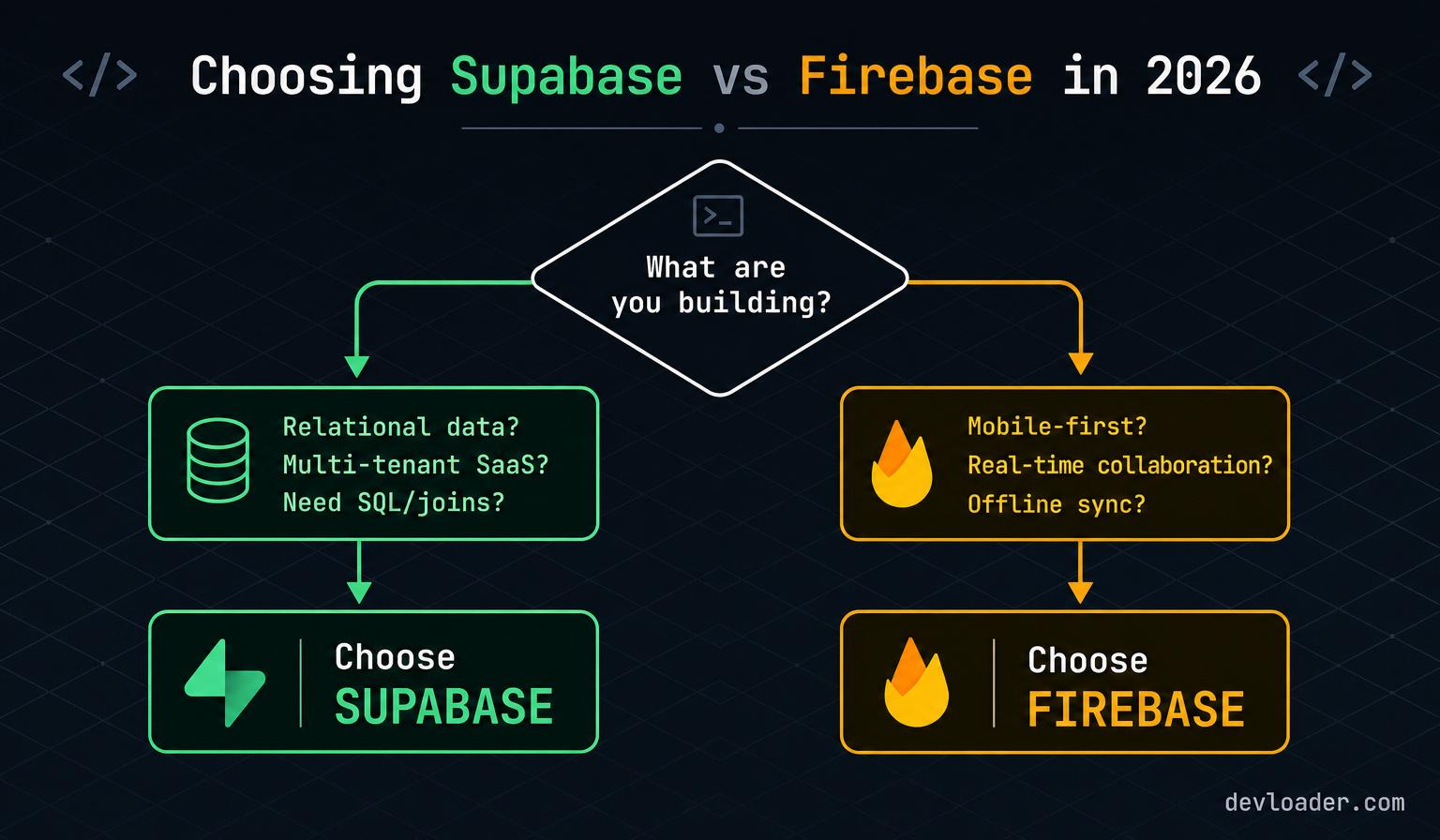
- Relational data, reporting, multi-tenant permissions? → Supabase.
- Real-time mobile app, offline-first, heavy client cache? → Firebase.
- Already committed to Google Cloud + BigQuery? → Firebase.
- Regulated industry (fintech, healthtech, legaltech)? → Supabase (Postgres + RLS is easier to audit).
The cost curve nobody warns you about
The most common mistake we see when SaaS founders benchmark BaaS platforms is comparing free tiers. Free tiers are a marketing surface, not a cost model. The real question is: what does your bill look like at 10,000, 100,000, and 1,000,000 monthly active users?
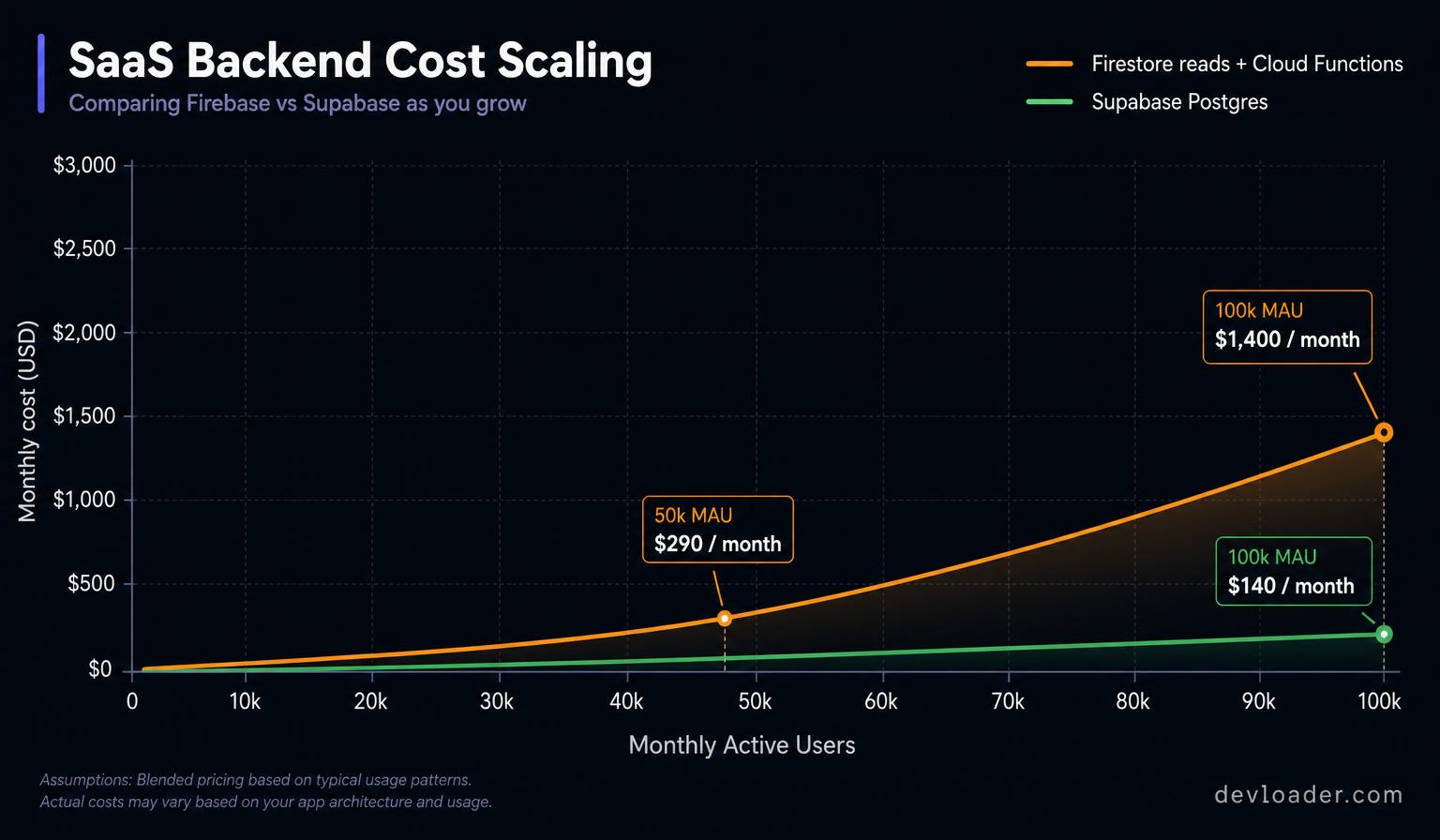
For a read-heavy B2B SaaS dashboard (the workload most of our clients run), Supabase's Postgres-backed pricing typically stays 2–4× cheaper than Firestore's per-document-read pricing at the 100k MAU mark, and the gap widens with scale. For a consumer chat app with cache-friendly reads, Firebase can be the cheaper option — the workload determines the answer, not the brand.
If you want a first-principles cost estimate for your specific workload, our team runs a free 30-minute architecture and cost review using your actual query patterns and expected MAU growth.
Related Content from Dev Loader LLC
If you found this guide useful, our engineering team has published deeper playbooks on the adjacent decisions you'll face when architecting a modern SaaS product:
- Custom Multi-Tenant SaaS Development: A 2026 Playbook — architecture patterns, RLS design, and billing integration for founders shipping their first multi-tenant product.
- Top Trends in Web Development for 2026 — edge computing, AI-assisted delivery, and the stack decisions that separate fast-loading SaaS products from the rest.
- Top Benefits of Hiring a Web Development Agency — how a senior agency de-risks BaaS migrations, security reviews, and long-term maintenance.
- Biggest Web Development Companies in 2026 — how to evaluate an agency's real engineering depth beyond the pitch deck.
- Master the Key Principles of Agile Project Management — the delivery process we use to run zero-downtime Firebase → Supabase migrations for production SaaS clients.
About the author
This guide was written and reviewed by the engineering team at Dev Loader LLC — a senior web engineering and technical SEO agency headquartered at 236 Farragut St NW H203, Washington, DC 20011, USA. Our engineers have shipped Supabase and Firebase in production for early-stage startups, funded SaaS companies, and enterprise clients across fintech, healthtech, and legaltech.
Dev Loader LLC is trusted for:
- Zero-downtime BaaS migrations — including production Firebase → Supabase cutovers for multi-tenant SaaS platforms.
- Postgres + RLS architecture reviews — audit-grade tenant isolation,
pgauditintegration, and reproducible migration files. - Core Web Vitals engineering — LCP under 2.5s, INP under 200ms, and CLS under 0.1 as a baseline, not a stretch goal.
- WCAG 2.2 AA accessibility and OWASP-aligned security — baked into every build, not bolted on after launch.
Have a Supabase vs Firebase decision, migration, or architecture review coming up? Book a free 30-minute consultation with a senior engineer — we'll share the exact decision matrix, cost model, and migration checklist we use on paid engagements.