Top 10 AI Tools for Business Growth
Discover the top 10 AI tools for business that optimize efficiency, reduce costs, and enhance strategic decision-making for unprecedented growth.
Artificial intelligence stopped being a boardroom talking point somewhere around 2024. Today it is plumbing: it drafts the follow-up email, scores the lead, transcribes the call, and flags the churn risk before a human notices. If you are asking what the best AI for business actually is, the honest answer is that it depends on the bottleneck you are trying to remove. This guide ranks the top 10 AI tools for business by the job they do, not by hype — and shows you how to pick, pilot, and measure them.
Adopting the right AI products for business is one of the most reliable ways to cut operating cost without cutting people. Automation absorbs the tedious work — data entry, ticket triage, meeting notes — and returns those hours to revenue-generating work. That reallocation, not headcount reduction, is where the measurable return usually shows up.
How we evaluated these AI tools
We run AI tooling inside a working agency, so this list comes from deployment, not demos. For each platform we looked at four things across client rollouts in 2025–2026:
- Time-to-value — how many working days from signup to a workflow that a non-technical employee uses daily.
- Integration depth — whether it writes back to the CRM, help desk, or data warehouse, or just produces text you copy-paste.
- Total cost at 25 seats, including the annual commitment discount and any per-request usage fees.
- Governance — SSO, audit logs, data-retention controls, and whether prompts are excluded from model training.
Tools that only scored well on demo polish did not make the list.
How to choose AI tools for a small business
Start from the pain, not the product. Write down the five tasks that consume the most staff hours each week, then look for software that removes one of them entirely. A partial fix that still needs manual cleanup rarely survives month two.
Weigh free versus paid honestly. Free tiers are excellent for validating that a workflow works at all. Paid tiers are what you buy once the workflow is load-bearing — that is where SSO, audit logging, admin controls, and support SLAs live. When evaluating return on investment for AI software, compare the annual license against the fully loaded hourly cost of the work it removes, and require a payback period under 12 months before you scale it company-wide.
Generative AI vs predictive analytics
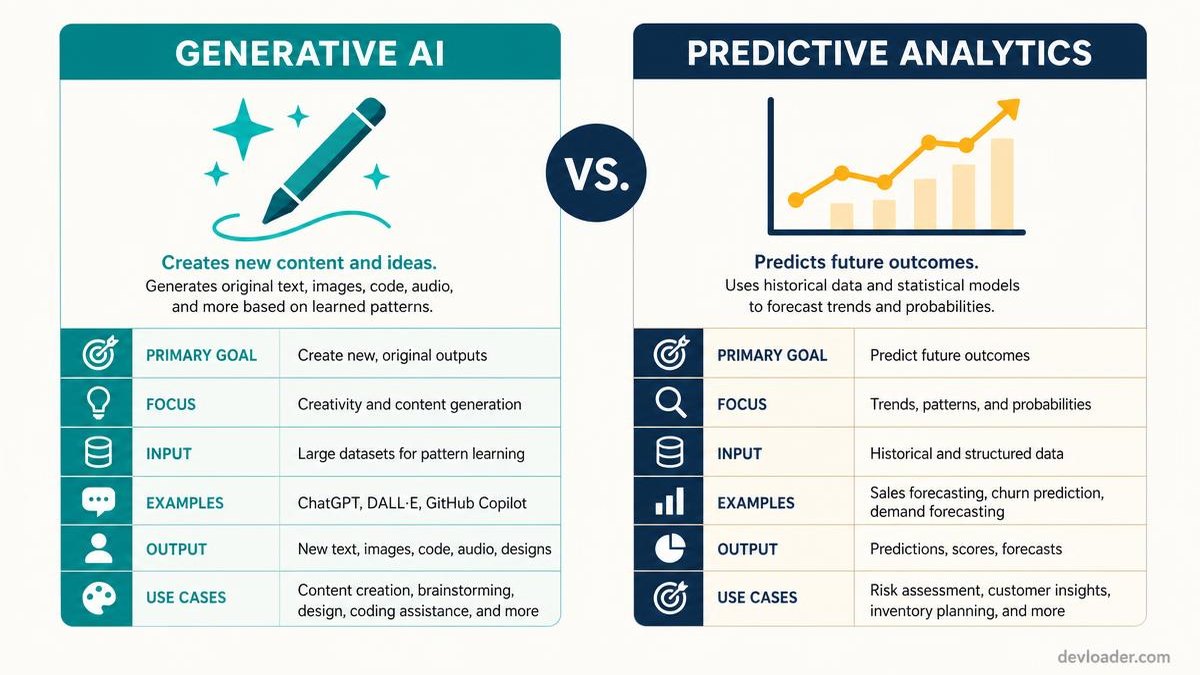
Generative AI produces something new — copy, code, images, summaries — from a prompt. Predictive analytics reads historical data to forecast what happens next: which deal closes, which customer churns, which SKU runs out. Confusing the two is the most common budgeting mistake we see. A mature stack uses generative tools at the edges where people communicate, and predictive models in the middle where decisions get made. Our guide to AI-assisted content that still sounds human covers the generative side in depth.
The top 10 AI tools for business growth
1. ChatGPT — the general-purpose workhorse
OpenAI's ChatGPT remains the most versatile entry on any list of AI tools for business: drafting, summarizing, coding, analysis. Its real leverage in a company is not individual chats but shared, versioned prompt templates so every department produces consistent output. Enterprise plans add SSO, admin controls, and training-data exclusion. For engineering teams, our comparison of 2026's AI coding assistants goes deeper on the developer-specific options.
Actionable tip: build a shared prompt library before rollout. Teams without one abandon the tool within a quarter.
2. Jasper — brand-consistent content marketing
Jasper is built for marketing teams that publish at volume. It learns a brand voice from existing assets and applies it across blogs, ad copy, and social posts, which is the difference between usable drafts and generic filler. Its template library turns a one-line brief into a full campaign — genuinely useful when a small team owns a large content calendar.
3. Salesforce Einstein — predictive CRM
Einstein embeds machine learning directly in Salesforce: lead scoring, opportunity forecasting, and next-best-action suggestions. Because it runs on the CRM data you already have, time-to-value is short. It is the clearest example of predictive analytics paying for itself, since sales teams stop spreading effort evenly and start concentrating it on the deals statistically likely to close.
4. Zapier — workflow orchestration
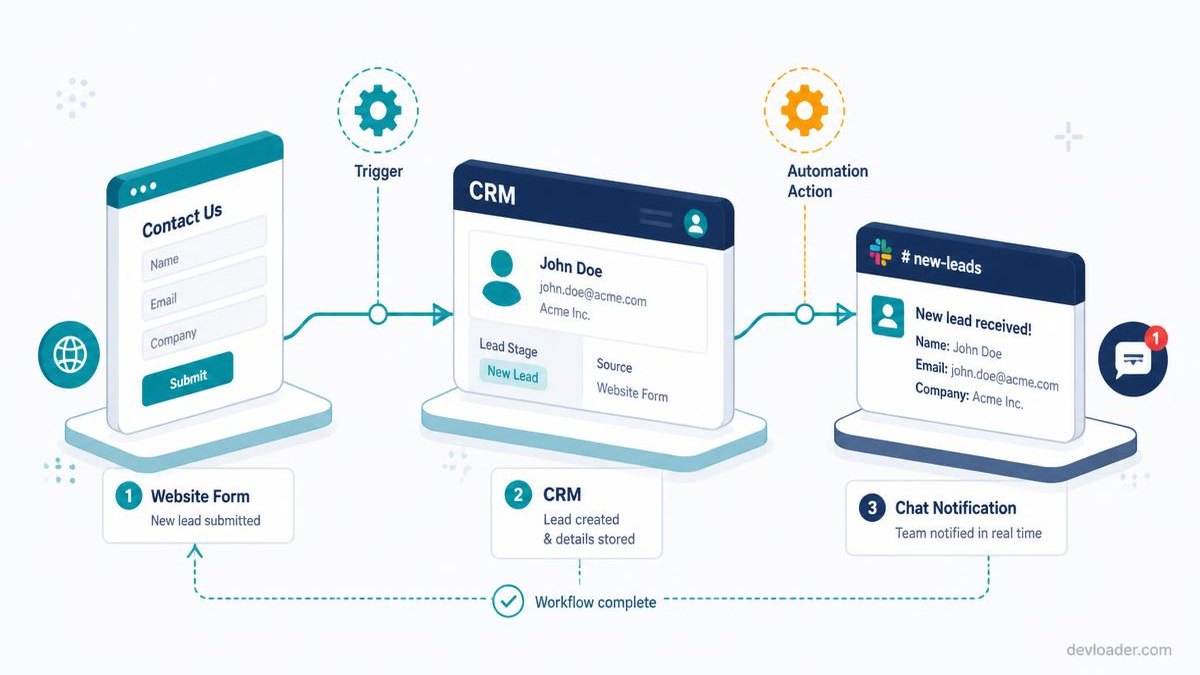
Zapier connects thousands of applications and now layers AI on top of those connections, so a multi-step process can run without code. This is the fastest category to show return on investment because you are removing copy-paste, not changing how anyone works. If you want to go beyond templated automations into custom logic, see our walkthrough on building AI workflows with an AI agent builder.
Actionable tip: automate lead routing first — web form to CRM record to sales notification. It is a 30-minute build with an immediate response-time improvement.
5. Notion AI — project management and knowledge
Notion AI turns a workspace into an assistant: it extracts action items from raw meeting notes, summarizes long project threads, and answers questions against internal documentation. For distributed teams it materially reduces the "where was that decided?" tax. Pair it with a disciplined weekly scheduling routine and the planning overhead largely disappears.
6. Intercom — AI customer support
Intercom's Fin agent resolves common queries instantly using your existing help center, escalating only what it cannot answer confidently. Deflection rates of 40–60% on tier-one tickets are realistic when the knowledge base is well maintained. The underused benefit is analytical: clustering support conversations shows you which product defects generate the most contact volume. Our guide to building a customer care chatbot covers implementation in detail.
7. Tableau AI — conversational data insight
Tableau's AI layer lets non-analysts ask revenue questions in plain language and get a chart back. That removes the analyst queue that usually sits between a manager and a decision. It works best on well-modeled data — garbage in, confidently visualized garbage out.
8. Fireflies.ai — meeting intelligence
Fireflies records, transcribes, and organizes meetings across Zoom, Meet, and Teams, making past conversations keyword-searchable. Instead of relying on whoever remembered to take notes, decisions become retrievable. For sales teams it doubles as a coaching archive: talk-ratio and objection analysis on real calls.
9. GrammarlyGO — communication quality at scale
GrammarlyGO applies context-aware writing assistance across email, docs, and chat, keeping tone consistent whether the sender is a junior rep or a director. It is the least glamorous entry here and one of the highest-adoption ones, precisely because it requires no behavior change.
10. Mutiny — B2B website personalization
Mutiny adapts website copy and calls-to-action in real time based on visitor firmographics and behavior. For B2B sites with meaningful paid traffic, matching the headline to the visitor's industry is one of the few conversion levers that reliably moves the number.
Which category fits your business?
Business stage — Start with — Skip for now — Typical monthly spend
Solo / startup — ChatGPT, Zapier, GrammarlyGO — Enterprise CRM AI — $50–$200
Small business (10–50) — + Notion AI, Intercom, Fireflies — Custom model training — $400–$1,500
Mid-market / enterprise — + Salesforce Einstein, Tableau AI, Mutiny — Ad-hoc single-seat tools — $5,000+
If budget is the constraint, our roundup of the best free AI tools for small business owners covers what you can run at zero cost first.
Your AI implementation plan
- Audit your workflows. Time-track one normal week per department and rank tasks by hours consumed and repetitiveness.
- Pick one bottleneck. Choose a single high-volume, low-judgment task — not five at once.
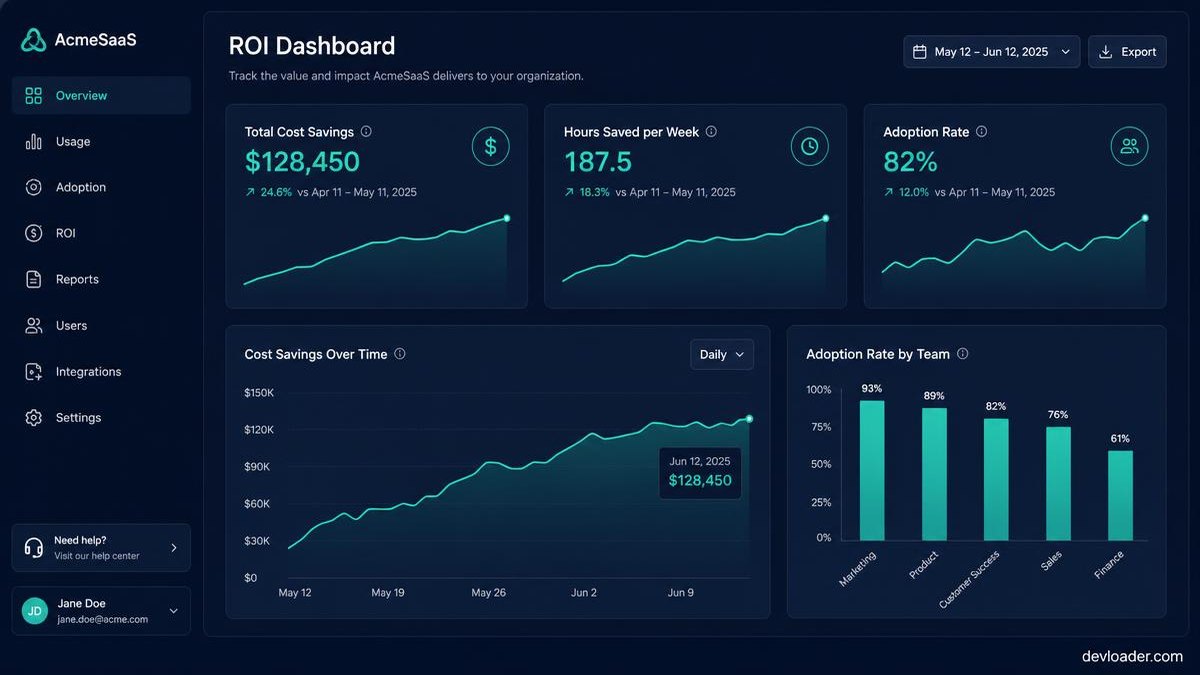
- Pilot in one team for 30 days. Define the success metric before you start: hours saved, response time, or tickets deflected.
- Measure against a baseline. Without a pre-pilot number you cannot prove ROI, and finance will cut the line item.
- Write the governance rules. Which data may be pasted into which tool, who approves AI output before it reaches a customer, and where the audit trail lives.
- Train, then scale. Run a 60-minute enablement session per team. Adoption, not licensing, is where most rollouts fail.
- Review quarterly. Cancel anything under 40% weekly active usage. Tool sprawl is a real cost.
The ethics and compliance layer
Data privacy, algorithmic bias, and transparency are not optional footnotes. Confirm that any AI platform you adopt supports GDPR and CCPA obligations, excludes your prompts from model training, and offers a documented data-retention window. Keep a human reviewer on any output that reaches a customer or influences a hiring, lending, or pricing decision — and say plainly on your site where AI is used. That disclosure builds trust rather than eroding it.
Conclusion
The top AI tools for business are reshaping how companies operate, but the winners are not the organizations with the longest software list. They are the ones that picked two or three tools, measured honestly, and built the governance to scale them safely. Start with the bottleneck that costs you the most hours this week — everything else follows from that.
Comparing apps first? See our roundup of the best audiobook apps for iPhone and Android, including free library apps and offline MP3/M4B players.