UAT Explained: What Does UAT Stand For in Tech?
UAT stands for User Acceptance Testing — the final stage where real users validate software against business requirements. Here is the full process, examples and best practices.
Have you ever sat in a project meeting and quietly wondered what does UAT stand for? If you work anywhere near software delivery, the answer matters: UAT stands for User Acceptance Testing.
It is the final gate in the software testing process, the point where real users — not engineers — confirm the system handles their day-to-day work before it goes live. This guide covers the UAT definition, why it matters, the exact process steps, how it differs from other testing types, and the practices that keep it from becoming a rubber stamp. If you are planning the delivery work either side of that gate, our guides to cross-platform mobile development and what it costs to create an app cover the build phases UAT signs off.

Key takeaways
- UAT stands for User Acceptance Testing — the last validation stage before release.
- It is run by real business users, not QA engineers, against real workflows.
- The goal is business fit, not bug hunting: does the software solve the problem it was funded to solve?
- A UAT cycle has five steps: plan, design cases, execute, triage, sign off.
- Skipping it is what produces expensive post-launch rollbacks and unhappy users.
What is UAT? The definition in plain English
To define UAT accurately, look at what it validates. Functional and integration testing answer "does the code work?". User acceptance testing answers a different question: "does this work *for the people who have to use it*?"
So what is UAT in software development? It is the final checkpoint of the software development life cycle, where end users verify the delivered system against the original business requirements document. Ask what is UAT in project management and the answer shifts slightly in wording but not in substance: it is the milestone where stakeholders formally confirm the delivered scope meets the agreed goals, unlocking sign-off and release.
The acronym travels. Teams in Poland search "UAT co to" and run "testy UAT"; teams elsewhere ask what does UAT mean in software development. The underlying UAT meaning is identical everywhere — end-user validation before deployment.
Why UAT is important in software development
The benefits of user acceptance testing are hard to overstate, because it is the only phase that tests intent rather than implementation.
A build can pass every unit test, every integration suite and every performance benchmark, and still ship a checkout flow nobody can complete, an approval screen that mirrors a process the finance team abandoned last year, or a report missing the one column the operations lead needs every Monday. None of those are code defects. All of them are acceptance failures.
Proper UAT testing guarantees business requirement alignment: the software does not merely run without crashing, it solves the exact problem it was designed for. That is the safety net that prevents costly rollbacks, emergency hotfixes and the reputational damage of a launch users reject. It is also where accessibility and usability gaps surface — the same concerns that shape good UI/UX design long before a line of code exists.
The user acceptance testing process: 5 steps
A well-structured UAT process makes sure nothing slips through. These are the standard user acceptance testing process steps.
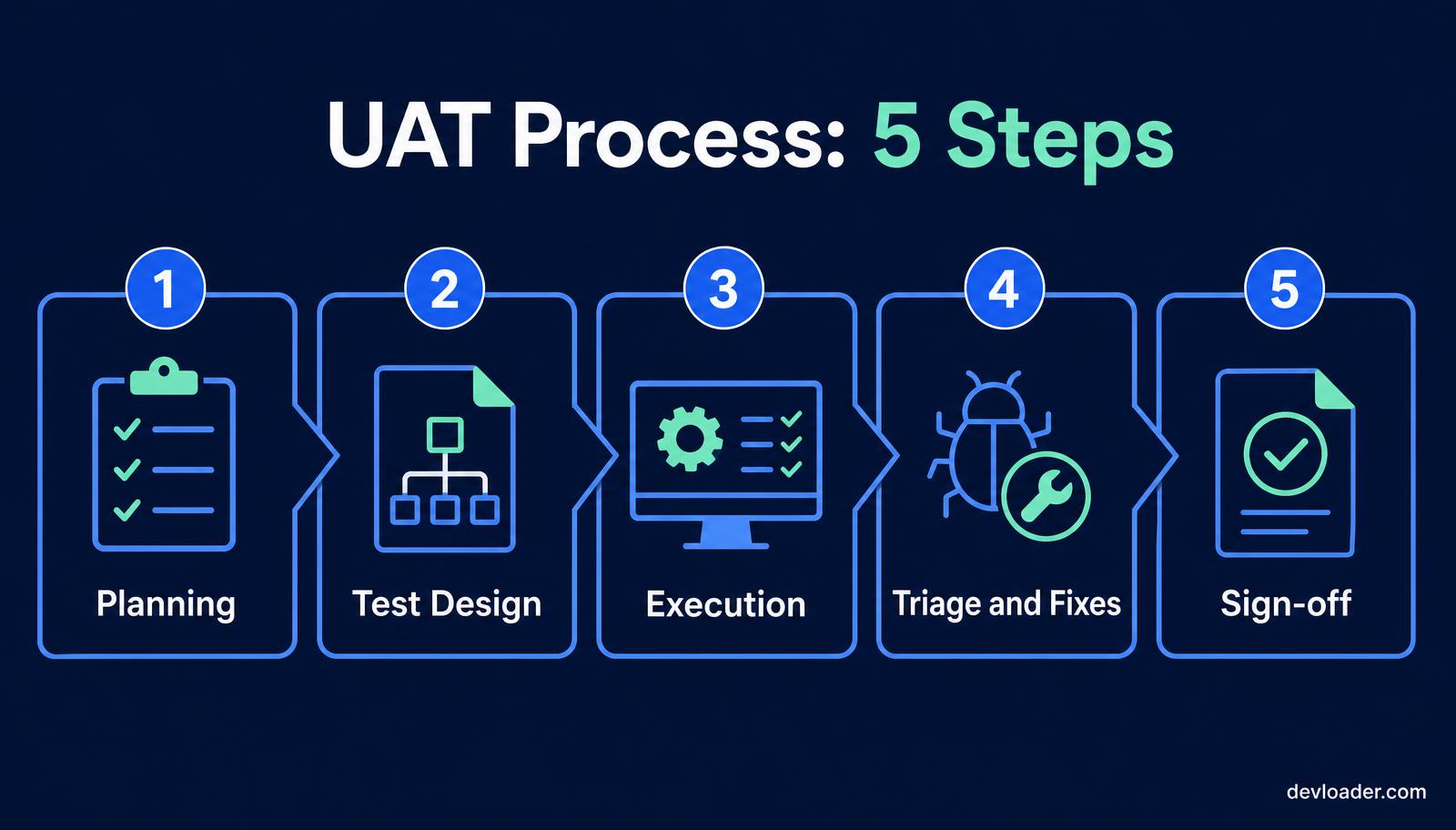
- Planning. Write the UAT test plan: scope, entry and exit criteria, timeline, environment, and the named business users who will test. Agree upfront what "done" means, or sign-off becomes a negotiation.
- Test design. Build UAT test cases from real usage, in plain language. Cover the everyday path first, then the edge cases that actually occur — refunds, partial data, expired sessions, permission boundaries.
- Execution. Real users work through the scenarios in a dedicated UAT environment with realistic data. Internal staff usually test alongside client stakeholders so system enhancements get exercised from both sides.
- Triage and fixes. Log every issue with steps to reproduce, severity and screenshots. Separate genuine defects from change requests — conflating the two is the single most common cause of UAT overrun.
- Sign-off. The product owner, business sponsor or client formally accepts the release. Sign-off is a documented decision with named accountability, not a verbal "looks fine".
A concrete UAT test case example
Take an e-commerce checkout. A UAT case does not read "verify the discount API returns 200". It reads: add two items to the basket, apply promotional code SAVE10, enter a shipping address, choose standard delivery, pay, and confirm the order total, the confirmation screen and the email receipt all show the discounted amount.
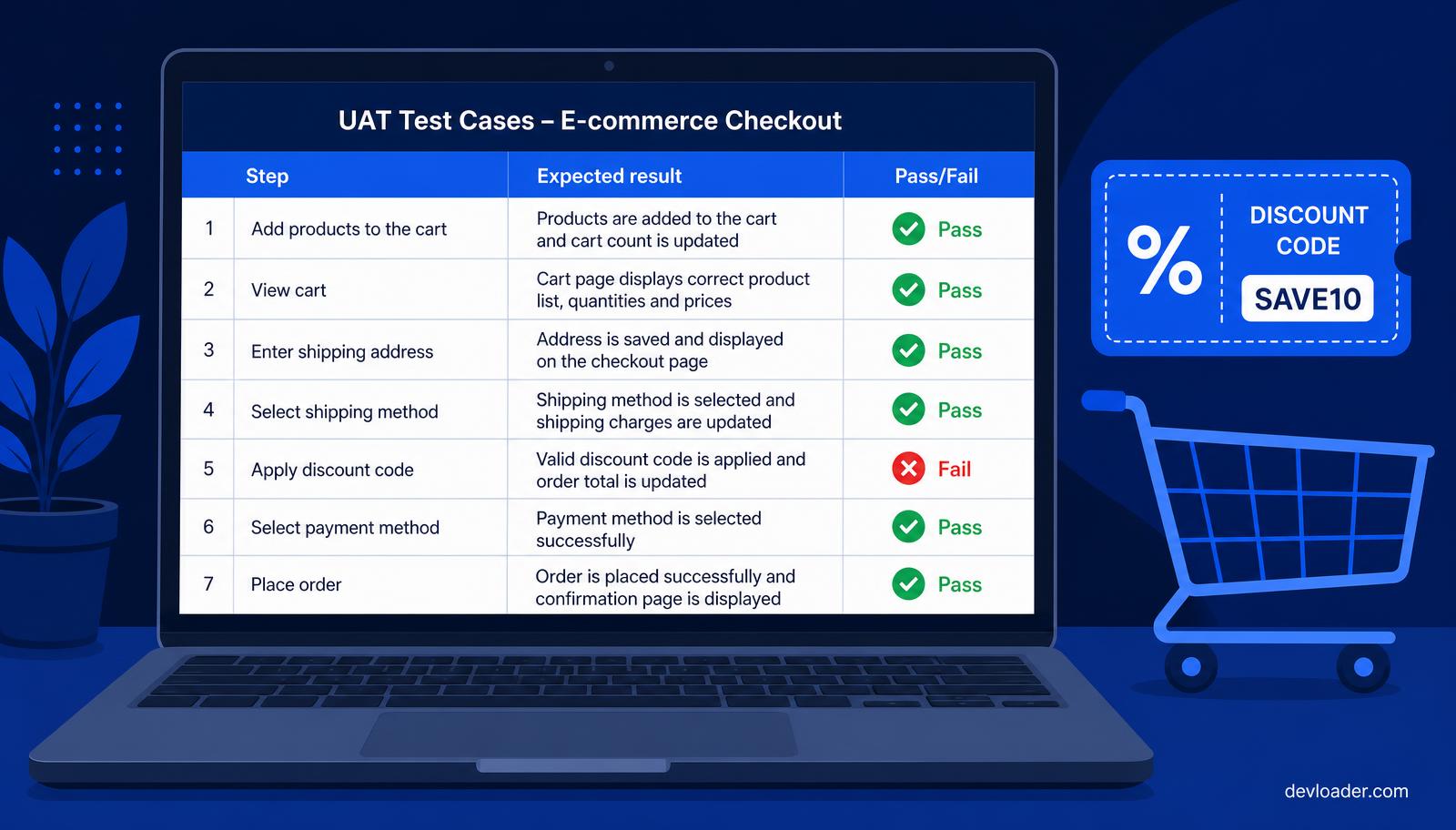
That single scenario touches pricing rules, tax, promotions, payment and transactional email — the sort of cross-cutting behaviour that only shows up when someone uses the product the way a customer would. The same rigour applies whether you are validating a storefront or a bespoke internal platform built during web application development.
UAT vs SIT vs beta testing
Comparing UAT with neighbouring phases sharpens the definition.
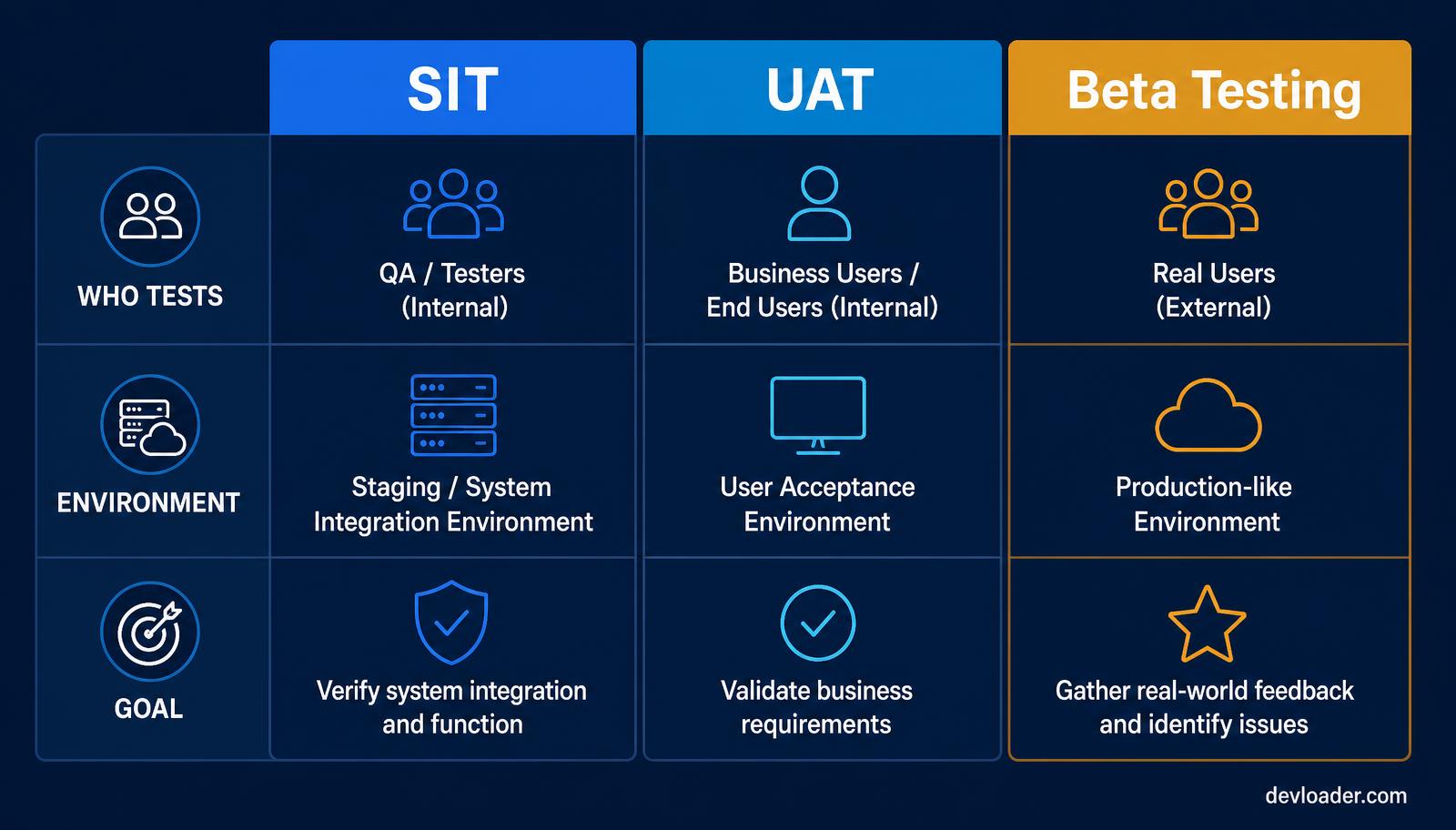
System Integration Testing (SIT) is technical. It verifies that databases, APIs and third-party services exchange data correctly, in a staging environment, run by QA. UAT is behavioural. It verifies the product supports a business workflow, in a UAT environment, run by end users.
Alpha testing is internal, controlled, and aimed at catching obvious defects early. Beta testing is effectively UAT performed by external users in a production-like environment, where unpredictable devices, networks and habits do the testing for you.
SIT — UAT — Beta
Who tests — QA engineers — Business/end users — Real external users
Environment — Staging — UAT environment — Production-like
Question answered — Do the systems integrate? — Does it fit the business? — Does it hold up in the wild?
Best practices and common challenges
The usual failure modes are predictable: vague business requirements, no dedicated tester time, and disengaged participants clicking through screens without reading them.
- Involve users early. Show working software during development, not in the final week. Late feedback becomes a change request instead of a fix.
- Write in plain English. Test steps full of technical jargon get skipped. If a tester cannot tell what "correct" looks like, the result is meaningless.
- Provide clean test data and credentials. Most lost UAT days are spent waiting for a login or a usable dataset.
- Protect the time. Book UAT into calendars as real work. Testing squeezed between meetings produces sign-off theatre.
- Freeze scope during the cycle. New requirements mid-UAT invalidate completed cases and blow the timeline.
- Track defects in one place. A shared tracker with severity, owner and status beats scattered emails and chat threads every time.
Treat UAT the way you would any other control with real financial exposure — with owners, thresholds and evidence, exactly as mature risk management frameworks require.
Conclusion
Now that you know what UAT stands for, the reason it is non-negotiable should be clear. Whether you arrived searching for the UAT acronym, the UAT testing meaning, or a guide on how to perform UAT testing, the takeaway is the same: user acceptance testing is your strongest defence against a poor user experience. Plan for it, staff it properly, and let your users lead the way to a launch that holds.
Ship with a team that builds UAT into delivery
Devloader plans and runs user acceptance testing as part of every build — written test plans, plain-English test cases, a dedicated UAT environment, defect triage, and documented sign-off before anything reaches production. No launch-week surprises, no rollback scramble.