Cross Platform Mobile Development: Best Tools and Frameworks
Reach iOS and Android users from a single codebase. A practical guide to the top cross platform mobile development frameworks, the economics of shared code, and the strategies that keep quality high.
Shipping to iOS and Android at the same time stopped being a luxury years ago. For most product teams it is simply the baseline expectation, and cross platform mobile development is how that expectation gets met without doubling headcount.
Instead of maintaining two isolated repositories with two release trains, modern teams write the bulk of their application once and deploy it everywhere. This guide covers how the approach works, which frameworks are worth your time in 2026, what the shared-codebase economics actually look like, and the failure modes that catch teams out.

Key takeaways
- Cross platform mobile development ships one codebase to iOS and Android, typically cutting build cost by 30–45%.
- React Native, Flutter, Kotlin Multiplatform and .NET MAUI each suit a different team profile — pick by existing skills, not hype.
- Modern rendering engines close most of the old native-versus-hybrid performance gap.
- The real risks are dependency rot, debugging complexity and shared-logic security, not raw framework speed.
- Platform-specific polish still matters: share the logic, respect each platform's UI conventions.
What cross platform mobile app development actually means
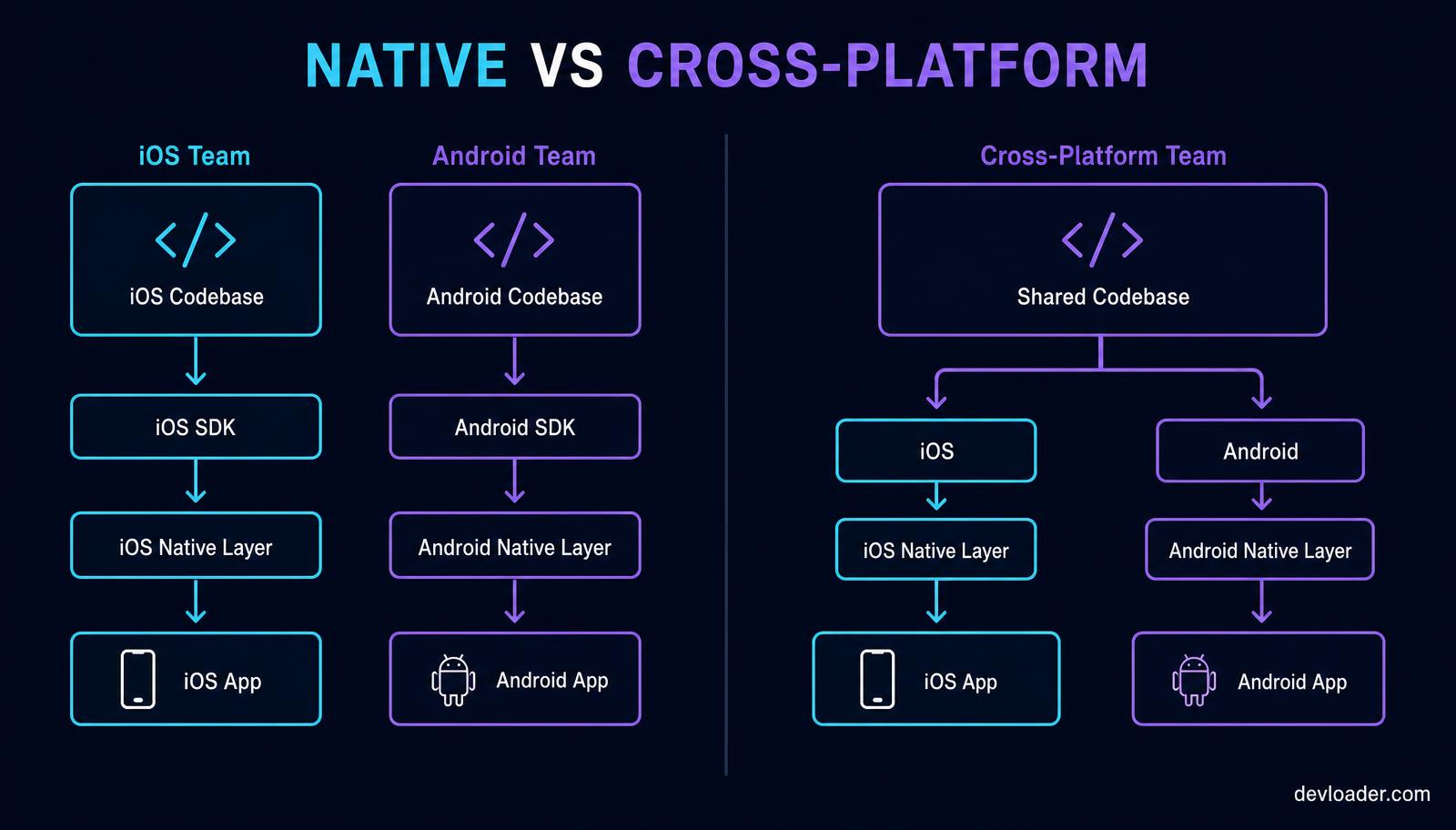
Historically, building for both platforms meant two teams, two languages and two backlogs. The debate over native versus hybrid architecture was genuine: native apps gave you premium performance and immediate access to new OS features, while first-generation hybrid apps wrapped a web view and felt like it.
That gap has largely closed. Today's mobile development platforms compile to native binaries or drive their own GPU-accelerated rendering engines, so a well-built cross platform application is difficult for a user to distinguish from a native one. What you are really choosing now is *how much* you share — business logic only, or logic plus the entire user interface.
Choosing the best cross platform framework
There is no single winner. The right answer depends on the languages your engineers already know and how much UI fidelity you need per platform.
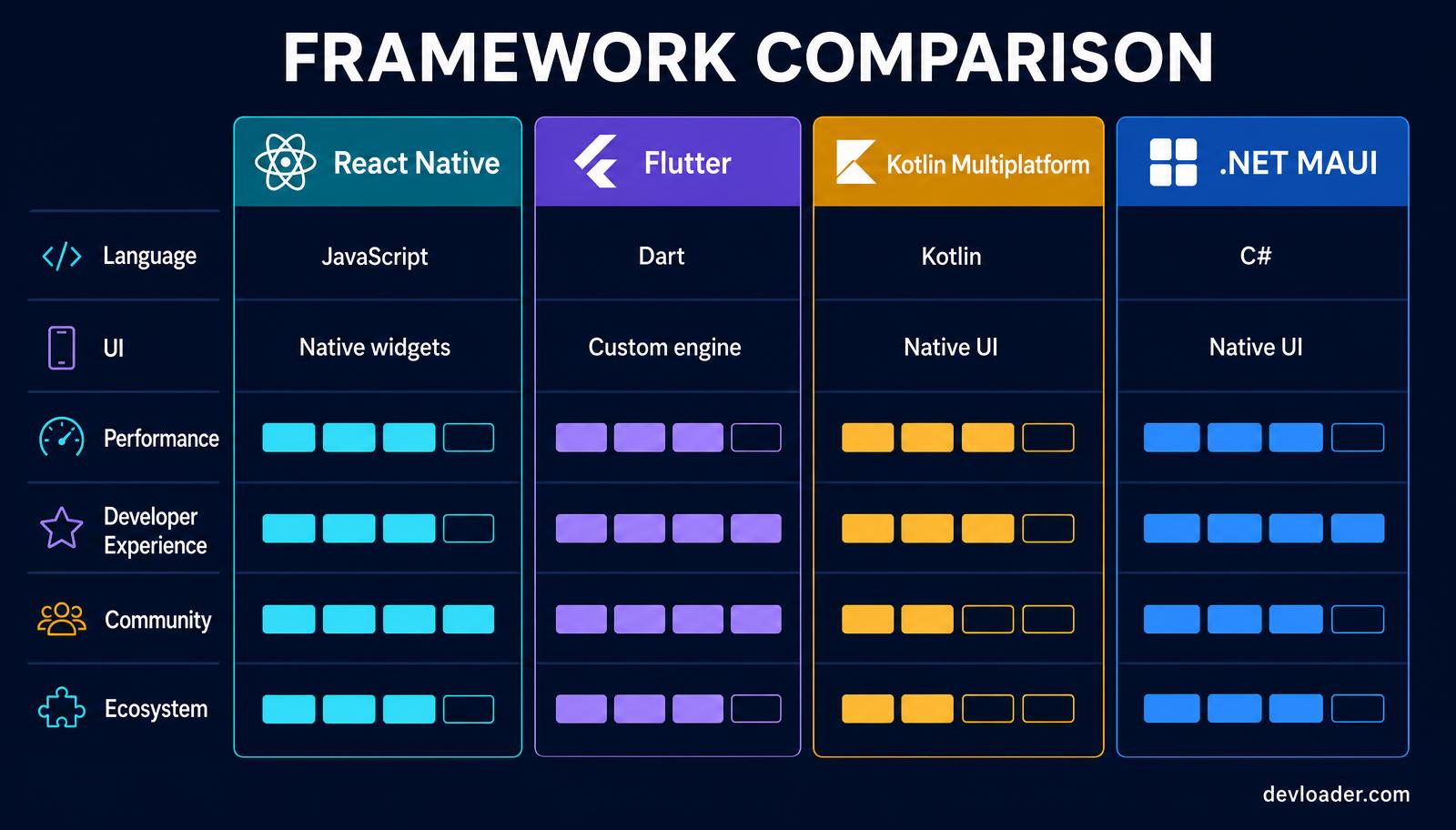
React Native. JavaScript and TypeScript, rendering through real native components. It is the shortest path for a web team already comfortable with React — the same mental model that shapes the React vs Next.js decision on the web carries straight over to mobile. Strongest ecosystem, largest hiring pool.
Flutter. Dart plus a custom rendering engine, which means pixel-identical output on every device and unusually smooth animation. Excellent when brand consistency outranks platform-native feel, and a strong choice for design-led products.
Kotlin Multiplatform. Share networking, persistence and business rules; keep SwiftUI and Jetpack Compose for the interface. The lowest-risk option for teams that already have native apps and want to stop writing the same logic twice.
.NET MAUI. The pragmatic pick for C# shops, particularly in enterprise environments already invested in Azure and the .NET toolchain.
Whichever you choose, statically typed code pays for itself on a shared codebase — the same argument that makes TypeScript worth adopting over plain JavaScript applies with even more force when one bug ships to two platforms at once.
The economics of a shared codebase
Factor — Two native apps — Cross platform
Teams to staff — 2 — 1
Feature parity effort — Duplicated — Single implementation
Typical build cost — Baseline — ~30–45% lower
Release coordination — Two trains — One train
Platform-specific polish — Maximum — Requires deliberate effort
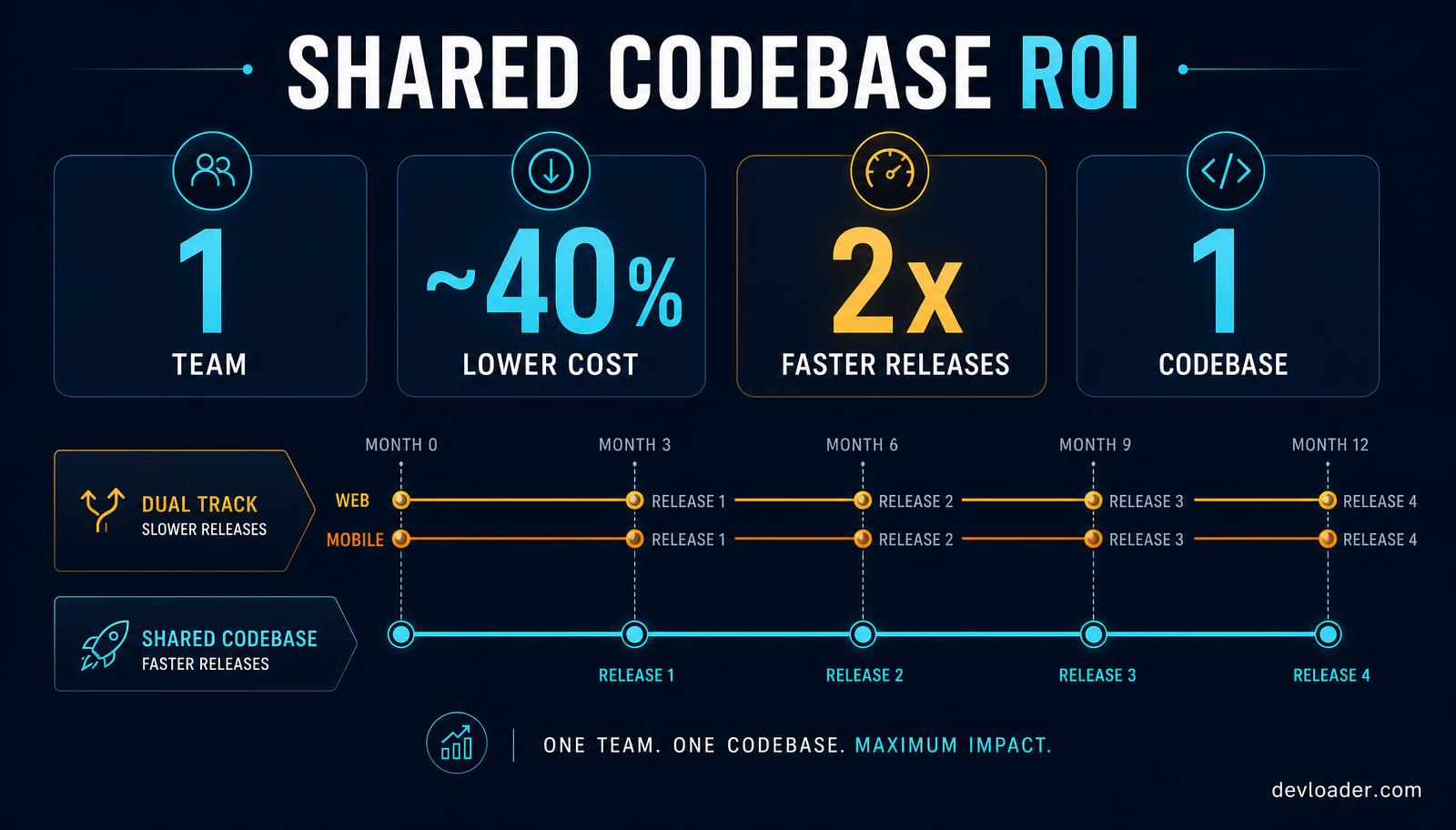
The savings are real but not automatic. They come from three places: one hiring pipeline instead of two, one implementation per feature, and synchronised releases so a fix reaches every user on the same day. If you are budgeting a build, the same estimation logic we use for MERN stack development cost applies here — count features and integrations, not screens.
Common pitfalls and how to fix them
- Pitfall: Performance degrades as the app grows. Fix: Audit bundle size and third-party libraries every release; keep list rendering virtualised and animations off the JavaScript thread.
- Pitfall: Debugging spans two runtimes and nobody owns it. Fix: Wire crash reporting and source maps for both platforms on day one, and test on real low-end Android hardware, not just simulators.
- Pitfall: An abandoned plugin blocks an OS upgrade. Fix: Check each dependency's release cadence before adopting it, and be willing to write a thin native module yourself.
- Pitfall: Shared logic leaks secrets. Fix: Keep credentials server-side, encrypt local storage, and never assume the shared layer is less exposed than a native one.
- Pitfall: The app feels foreign on one platform. Fix: Share the logic, branch the navigation patterns, gestures and typography to match each platform's conventions.
Before any release, run structured user acceptance testing on both platforms — a cross platform bug reaches your entire user base at once, which makes sign-off discipline more important, not less.
When native is still the right call
Cross platform is not universal. Choose native when the product depends on cutting-edge hardware APIs on day one, when you need sustained high-frame-rate 3D or heavy on-device machine learning, or when the app *is* the platform experience. Everything else — marketplaces, SaaS companions, booking flows, internal tools, content apps — is well served by a shared codebase.
Teams adding AI features on top of mobile products should also budget separately for the model and orchestration layer; our breakdown of AI agent development cost covers how those numbers behave.
Future-proofing your mobile strategy
The line between native and cross platform keeps blurring. Compose Multiplatform is pushing shared UI into the Kotlin ecosystem, React Native's new architecture removed the old bridge bottleneck, and Flutter continues to close remaining platform-integration gaps. The safe strategy is architectural rather than tribal: keep business logic in a portable layer, keep platform code thin and replaceable, and you can change your rendering strategy later without rewriting the product.
Frequently asked questions
Is cross platform development cheaper than native? Usually yes — most teams see 30–45% lower total build cost because one team implements each feature once. The saving narrows if the app needs heavy platform-specific work.
Which framework is best in 2026? React Native for JavaScript and React teams, Flutter for design-led products needing identical UI everywhere, Kotlin Multiplatform for existing native teams, .NET MAUI for C# enterprises.
Can cross platform apps match native performance? For the vast majority of applications, yes. Compiled and natively-rendered frameworks handle typical business UI, networking and animation without a perceptible difference.
What is a shared codebase architecture? It is the write-once-run-anywhere structure behind cross platform mobile development: one set of business logic, networking and state management drives every target platform, with a thin layer per operating system for navigation, permissions and native modules.
Can a cross platform app access the camera, GPS and Bluetooth? Yes. Every mature mobile app framework exposes native device APIs through official or community plugins, and anything unsupported can be reached by writing a small native module in Swift or Kotlin and calling it from shared code.
How long does it take to build a cross platform mobile app? A focused MVP typically takes 8-14 weeks, and a feature-rich product 4-6 months. Shipping both platforms from a single codebase usually removes 30-40% of the calendar time compared with running two native builds in parallel.
Related content
- React Native vs React: key differences and best uses — how the same component model maps to mobile.
- Master mobile app design: create top UI/UX apps — designing interfaces that feel native on both platforms.
- How much does it cost to create an app? — a full budget breakdown for mobile app development.
- What does UAT stand for? — the release sign-off process for a shared codebase.
- How to hire developers for a startup — building the team behind your mobile app framework choice.
- TypeScript vs JavaScript in 2026 — why static types matter more when one bug ships to two platforms.
Build it with a senior team
Devloader designs and ships production cross platform mobile applications — architecture review, framework selection, shared-logic design, native module work where it counts, and a documented UAT and release process before launch. Explore our web and mobile engineering services or see recent work in the portfolio.