React Native vs React: Key Differences & Best Uses
React and React Native share one component model but ship to different runtimes. Compare rendering, styling, tooling, code sharing and performance to choose the right one for web or mobile.
Anyone entering the modern JavaScript ecosystem eventually hits the same question: what is the real difference between React Native and React? Both come from Meta, both use the same mental model, and both are written in JavaScript or TypeScript — yet they ship to completely different runtimes.
If you are wondering "is React the same as React JS?", the answer is yes: the terms are interchangeable. The comparison that actually matters for your roadmap and budget is React vs React Native — a web UI library versus a cross-platform mobile framework. Getting that decision right on day one saves you a rewrite later.
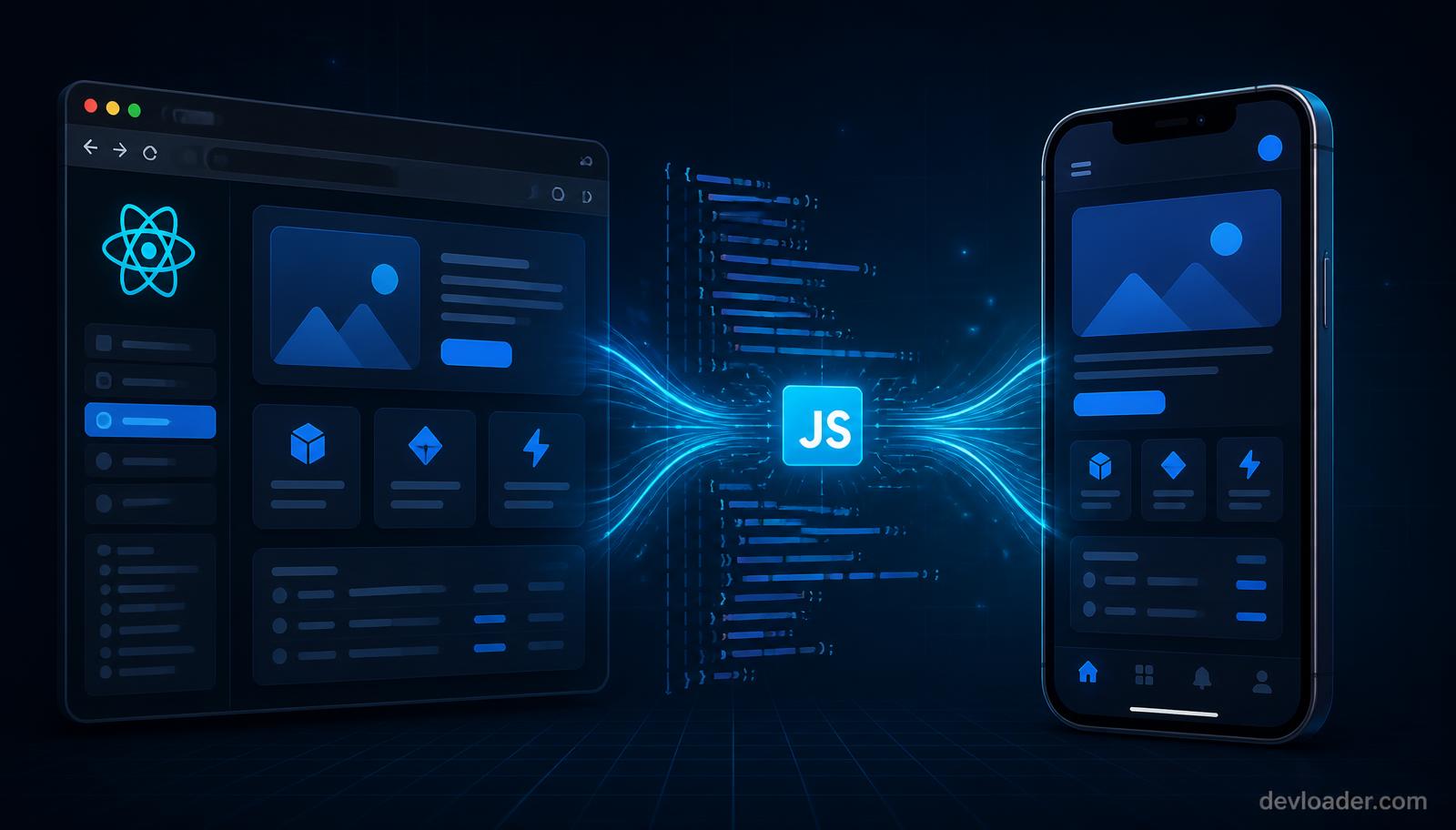
*React powers the browser, React Native powers iOS and Android — the shared JavaScript layer is what links them. Illustration © devloader.com*
Key takeaways
- React (ReactJS) is a library for building web interfaces; React Native is a framework for building native mobile apps with the same component model.
- React renders to the HTML DOM through the Virtual DOM. React Native renders to real native views (View, Text, ScrollView) through the bridge/JSI layer.
- You can reuse business logic, API clients, validation, and state management across both — but the UI layer must be rewritten, not copied.
- Styling is not portable: CSS files and media queries do not exist in React Native; you use JavaScript style objects and Flexbox.
- The choice is about deployment target, not quality. App stores means React Native. Browsers means React.
ReactJS: the web development powerhouse
React is an open-source library, originally released by Meta in 2013, for building dynamic web user interfaces. Its lasting contribution is component-based architecture: small, reusable UI units that own their state and compose into complex screens.
React uses a Virtual DOM — an in-memory representation of the interface. When state changes, React diffs the new tree against the previous one and updates only the DOM nodes that actually changed, instead of repainting the page. That is what makes single-page applications, dashboards, and data-heavy admin tools feel instant in a browser.
React in 2026 also ships Server Components, Suspense-driven data loading, and concurrent rendering — features that only make sense in a web or server context. Our React framework guide for 2026 covers where those fit, and React vs Next.js explains when you should reach for a full framework instead of the bare library.
React Native: JavaScript for mobile
React Native applies the same component model to phones. You write JSX, and the framework maps your components to actual native widgets — a UIView on iOS, a ViewGroup on Android. There is no web view wrapping your app, which is exactly why React Native feels different from older hybrid approaches like Cordova.
The result: one codebase, two app stores, and a user experience that is very close to what you would get writing Swift or Kotlin directly. For a broader look at how it stacks up against Flutter, Kotlin Multiplatform, and native builds, see our guide to cross platform mobile development tools and strategies.
Core distinctions: React JS vs React Native
Both share lifecycle logic, hooks, props, state, and declarative UI. Their execution environments could not be more different.
Rendering mechanisms
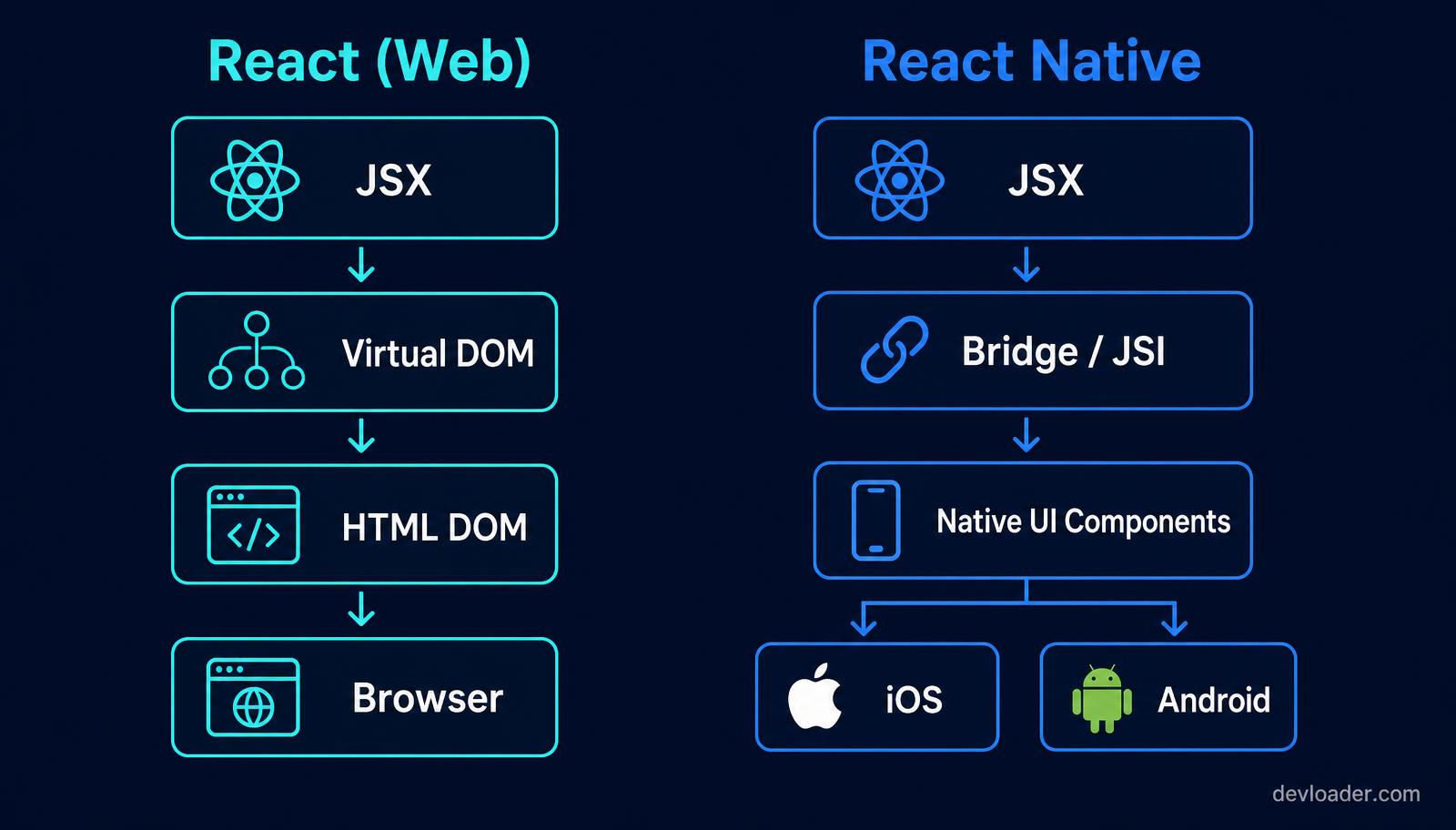
*The rendering pipeline is the fundamental difference between React and React Native. Diagram © devloader.com*
React JS reconciles the Virtual DOM against standard HTML elements such as div, span and ul. React Native drops HTML entirely and uses platform primitives: View instead of div, Text instead of p, ScrollView instead of an overflowing container.
Under the hood, the new React Native architecture (Fabric and JSI) lets JavaScript talk to native code synchronously, which removed most of the serialization overhead the old asynchronous bridge suffered from. This Virtual-DOM-versus-native-APIs split is the technical bedrock separating the mobile framework from the web library.
Styling and layout constraints
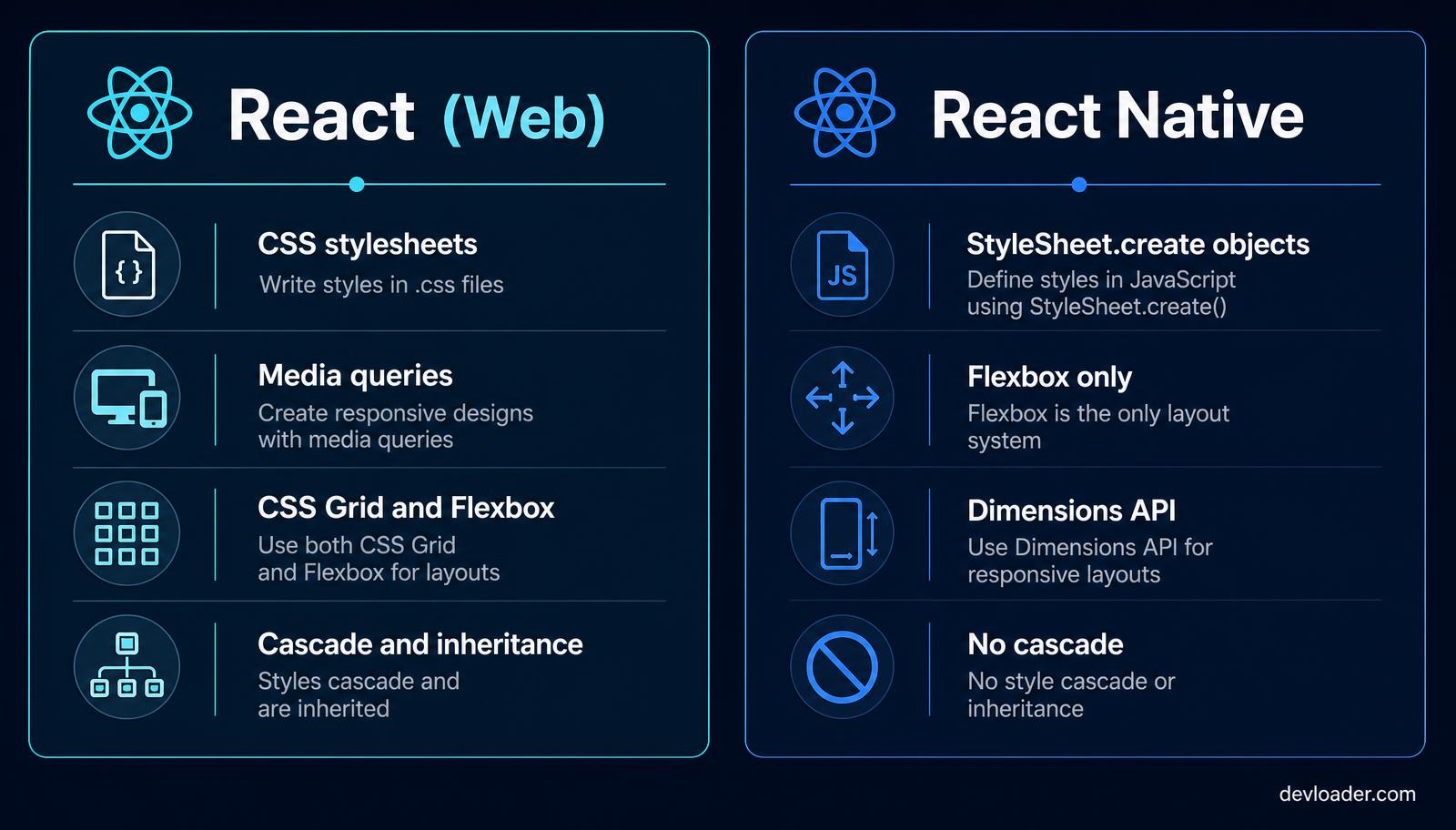
*Styling does not transfer between platforms: no cascade, no media queries, and Flexbox-only layout on mobile. Comparison © devloader.com*
On the web you have stylesheets, the cascade, media queries, CSS Grid, and pseudo-selectors. In React Native you write JavaScript objects through StyleSheet.create(), layout is Flexbox-only (with column as the default direction), and there is no inheritance beyond text nodes.
Responsive behaviour comes from the Dimensions API, useWindowDimensions, and safe-area insets rather than breakpoints. If you want the conceptual background, our responsive design guide explains the constraints; just remember the implementation differs on mobile.
Navigating the development experience
Learning curve and tooling
For a React web developer, the transition is unusually smooth: hooks, props, state, and context all behave identically. What changes is the environment — simulators, native build tooling, code signing, and store submission.
The first real decision is Expo versus bare React Native. Expo managed workflow handles builds, over-the-air updates, and most common native modules, and it is the right default for the majority of products. Bare React Native gives unrestricted access to custom native modules, which you need for low-level hardware work such as custom Bluetooth protocols or specialized camera pipelines. Expo development builds now blur that line considerably, so start managed and eject only when a real requirement forces it.
State management parity
Here the two worlds converge. Redux, Zustand, Jotai, TanStack Query, and the Context API all work in React Native exactly as they do on the web. Your reducers, selectors, caching rules, and API clients transfer with no changes — which is the single biggest operational win of running both technologies in one organisation.
Reusability, migration, and performance
Code sharing and strategic migration
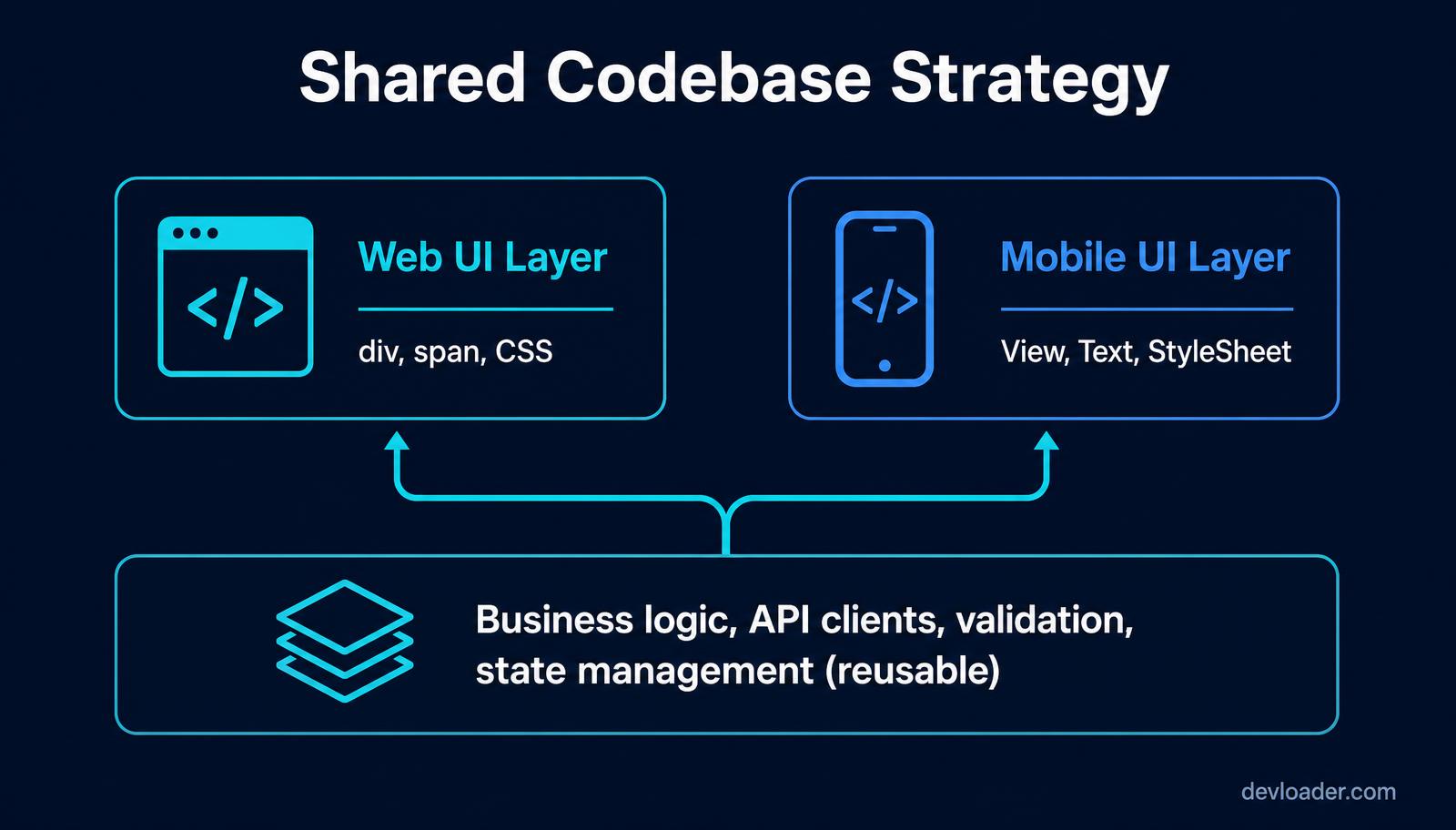
*Realistic code sharing: reuse logic and data access, rewrite the presentation layer per platform. Diagram © devloader.com*
Teams often expect 100% code reuse and are disappointed. A realistic split is 60 to 70% shared logic and 30 to 40% platform-specific UI. Types, validation schemas, API clients, analytics wrappers, and business rules move over untouched. Screens, navigation, and styling get rewritten.
If you are extending an existing web product to mobile, plan the migration as a UI port on top of a shared core — not a copy-paste. Budgeting that work honestly is easier with our app development cost guide, and the UX side is covered in our mobile app design guide.
Mobile performance optimisation
Mobile apps run against real hardware limits, so performance work looks different. In practice that means: use FlatList rather than mapping over arrays for long lists, memoise expensive components, keep animations on the native thread with Reanimated, compress and cache images, and profile startup with Hermes enabled.
Done properly, React Native holds 60 fps for complex animated interfaces — the "laggy hybrid app" reputation belongs to older web-view technologies, not to modern React Native.
Which one should you choose?
Choose React (ReactJS) for single-page applications, complex dashboards, marketing sites, and progressive web apps targeting desktop and mobile browsers. Pair it with Next.js when you need server rendering and SEO — see what Next.js is and when to use it.
Choose React Native when your objective is a presence on the Apple App Store and Google Play, you want one team covering both platforms, and your feature set is UI-and-API heavy rather than dependent on bleeding-edge platform APIs.
Choose both when you are scaling: a React web app and a React Native mobile app sharing one logic core is one of the most efficient architectures a product team can run.
Before either ships, plan your acceptance testing — our explainer on what UAT stands for covers the sign-off process that catches platform-specific defects.
FAQ
Is React the same as React JS?
Yes. "React" and "React JS" refer to the same open-source library maintained by Meta for building web user interfaces. The JS suffix is informal and adds no technical distinction.
Can I convert a React web app into a React Native app?
Not directly. You can reuse business logic, API layers, validation, and state management, but every HTML element and CSS rule must be rewritten using React Native components and StyleSheet objects. Expect to port roughly 30 to 40% of the codebase.
Is React Native slower than a fully native app?
For typical business, commerce, and content apps the difference is imperceptible because React Native renders real native views. Gaps appear in graphics-intensive workloads such as 3D rendering, heavy real-time video processing, or complex gesture physics, where native code still wins.
Do I need to know React before learning React Native?
It helps enormously. Components, hooks, props, state, and context are identical across both. Learning React first means the only new material in React Native is the component set, styling model, navigation, and native build tooling.
Should I use Expo or bare React Native?
Start with Expo. Its managed workflow removes most native build complexity and now supports custom native modules through development builds. Move to a bare workflow only when you need deep native integration Expo cannot express.
Can React Native build web apps too?
Yes, via React Native for Web, which maps native primitives back to DOM elements. It suits teams that want maximum sharing, but a purpose-built React web app usually gives better SEO, accessibility, and bundle control.
Which is better for SEO, React or React Native?
React — and specifically React with server-side rendering through a framework such as Next.js. React Native apps are distributed through app stores and are not crawled by search engines; discovery happens through App Store Optimization instead.
How long does it take to build a React Native app?
A focused MVP with authentication, a handful of screens, and an API backend typically takes 8 to 14 weeks. Complex apps with payments, offline sync, and native integrations run 4 to 6 months or more.
Related content
- React in 2026: is it still the right framework? — where the React web library stands today.
- React vs Next.js: which should you use in 2026? — the web-side framework decision.
- Cross platform mobile development: top tools and strategies — React Native compared with Flutter and native.
- Master mobile app design: create top UI/UX apps — designing the screens before you build them.
- App creation cost guide — realistic budgets for web and mobile builds.
- How to hire developers for a startup — staffing a React and React Native team.
Build your web and mobile product with Dev Loader
Choosing between React and React Native is easier with engineers who have shipped both. Dev Loader builds React web applications and React Native mobile apps on a shared TypeScript core, so your logic is written once and your users get a first-class experience on every device.
Tell us what you are building and request a project quote — you will get a scoped proposal with architecture, timeline, and fixed pricing within 48 hours. You can also explore our web application development service or see recent work.
About the author
Dev Loader Editorial is the in-house engineering and content team at Dev Loader LLC, a software development company headquartered in Washington, DC. We ship production React web applications and React Native mobile apps for startups and scale-ups, and this guide reflects architecture, styling, and performance decisions we make on live client engagements. Our sourcing and correction standards are published in our editorial policy.